The number of inputs to the Add function block is an extensible parameter. The block default is two inputs. You add inputs by right-clicking the function block diagram, clicking Extensible Parameters, and modifying the number of inputs. This creates additional input connectors for the block.
The Add function block uses the following equation to calculate the output:
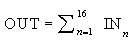
The following table shows an example of Add function block outputs based on different input values: