The DeltaV system allows you to group control strategies within modules into multiple layers of a diagram. These layers or groups are called composites. Although many control languages can be contained in a composite, they are represented on the diagram as a single element.
For example, if you opened a single composite on a function block diagram, you might find that it contains one or more additional function blocks and composites, or even a sequential function chart. Parameters can be wired to the composite so that data can pass in and out of it. Composites can be nested to a depth of six levels within the control module's diagram.
The following figure provides a graphical example of a single-level composite that is in a function block diagram. The composite in this example contains three function blocks.
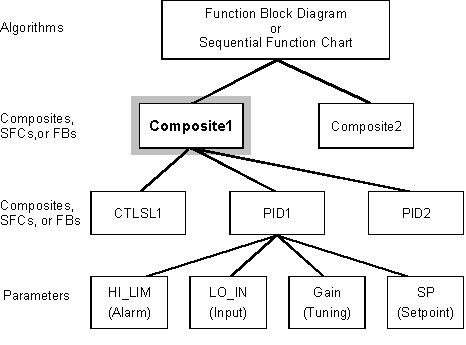
There are several ways that composites help to create control strategies. In addition to their manageability, composites can perform the following functions:
improve readability of a large control strategy by allowing you to group the elements into logical control tasks
provide a means to hierarchically organize your control strategies
allow control logic to be reused
allow the various control languages (Function Block Diagrams and Sequential Function Charts) to be intermixed within the same control module
provide a mechanism to develop control logic segments one time, store them in the library, maintain them in a single location, and still use that logic in a number of different control modules
The following figure provides a graphical example of how composites appear within a control strategy diagram.
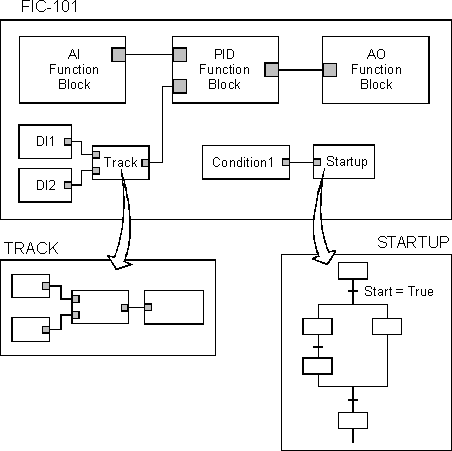
The control module's main diagram in the figure is a Function Block Diagram. The block labeled TRACK is a composite that contains additional function blocks. The block labeled STARTUP is a composite that contains a sequential function chart. Notice that the TRACK composite's data values are being received from and sent to the upper-level diagram. In the STARTUP composite, however, only a start signal is received from the top-level Function Block Diagram.
You add a composite to a Function Block Diagram by dragging the Custom Block on the Special Items palette to the function block diagram. You can add a composite to an SFC by right-clicking in the right side of the Hierarchy View and clicking Add.
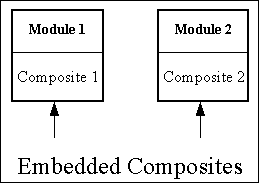
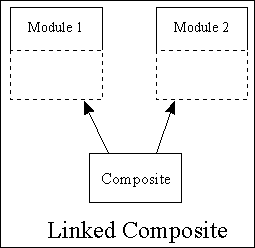
Composites can be either embedded or linked. Embedded composites are actually stored and maintained as part of the control module. Changes to an embedded composite can only affect the control module it belongs to. Linked composites, on the other hand, are stored within the DeltaV library. Any number of control modules can reference linked composites within their diagrams. Changes to the structure of these composites must be made within the DeltaV library. This way, all modules that reference the linked composite can be updated with the structural changes.
The following figure shows a representation of two modules that contain two separate, embedded blocks.
The following figure shows a representation of two modules that are linked to the same library composite.
Refer to the following sections for more information on linked and embedded composites.