The Control Selector function block is ideal for providing automatic override control. This function block can take three control signals as input. You can select SEL_TYPE=Low, Middle, or High for various control configurations.
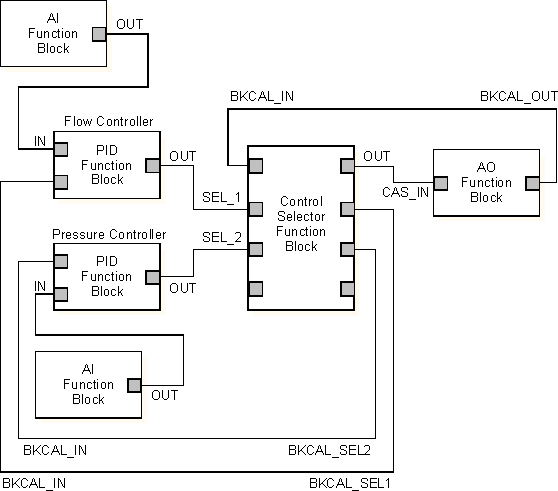
In the following image, a Fuzzy Logic Control (FLC) block is connected to a Control Selector block. Unlike the PID block that uses a positional control equation, the FLC block uses a velocity control equation and can cause output runaway on all blocks connected to a Control Selector block if a downstream block is limited. To prevent output runaway, put a Filter block on the BKCAL wire between the Control Selector block and the FLC block. For modules executing at one second, set the Filter block's TIMECONST parameter to 3 seconds.

Use the Control Selector function block in a situation where flow is the primary control variable but pressure must be controlled in the event that it rises to a dangerous level. The following figure illustrates this example:
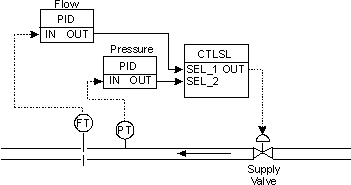
In this example, both the flow and pressure PID blocks control a supply valve. The flow PID operates in a pressure regime below a safety limit. Since this is a low pressure for the pressure PID, it sends a high output signal to the supply valve, telling it to open more to increase the pressure.
At normal operating pressures, the pressure PID's high SP requests a maximum valve opening to increase pressure. The flow PID's signal is lower than that of the pressure PID. In this case, SEL_TYPE is set to Low so that the Control Selector function block sends the flow PID's signal on to the supply valve and blocks the pressure PID's signal.
If the flow stream's pressure rises to a dangerous level, the pressure PID sends a low signal to the supply valve, telling it to close. When this output signal falls below that from the flow PID, the Control Selector function block begins to pass the pressure PID's signal and block the flow PID's signal.