You can use the Device Control function block for simple or complex discrete control. The following examples show some of the capabilities of the block.
Application example: simple shutdown
Assume you have a solenoid valve that is used to fill a tank. The valve has two positions: OPEN and CLOSED. The following figure illustrates this application:
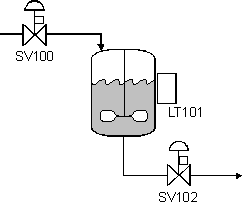
Assume you want the operator to be able to open or close the valve when the tank level is less than 100%, but the valve must close when the tank level reaches 100%. When the level reaches 100%, a Limit function block writes a shutdown signal to the Device Control block's SHUTDOWN_D input. SHUTDOWN_D holds the valve in the CLOSED (Passive) state. The following figure is the function block diagram for this example:
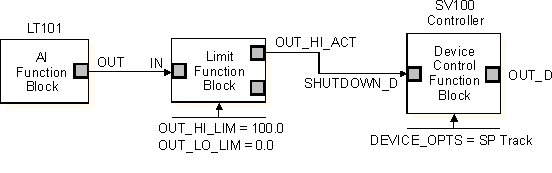
Assume the solenoid valve responds to a single discrete input for its commanded state. A False (0) value represents the close action and a True (1) value represents the open action. You select the SP Track device option to force the SP_D to the CLOSED (Passive) state when the tank is full.
 WARNING!
Disabling this option can potentially start the equipment when unattended if the SP is left Active following a failed start due to an interlock.
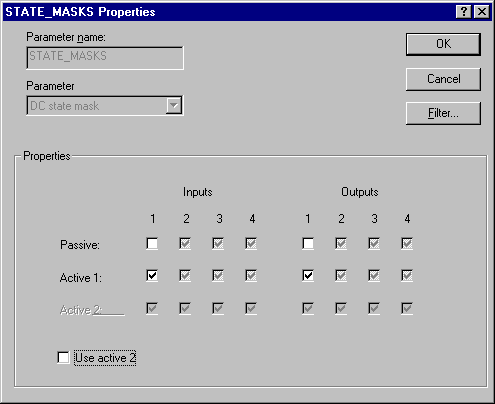
A single output is used to feedback the actual state of the valve. A False value indicates the valve is CLOSED and a True value indicates the valve is OPEN. You configure the STATE_MASKS parameter to match these signals, as in the following example. The Active 2 state is not used.
Application example: simple interlock
Assume you have a pump that you want the operator to turn on only when the downstream valve is open. The following figure illustrates this application:
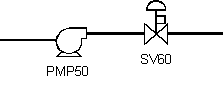
The OPEN/CLOSED signal from the valve is used as an input to the Device Control function block's INTERLOCK_D parameter. This prevents the pump from being turned on when the valve is closed.
The following figure is the function block diagram for this example:
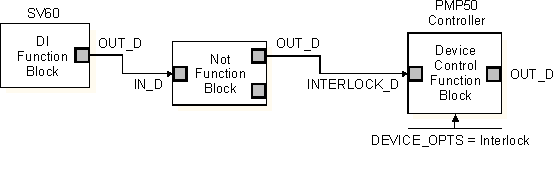
You select the Interlock device option so the Device Control block considers the INTERLOCK_D parameter in its logic. When the SV60 valve is CLOSED (False [0]), the interlock is Active and the operator request to turn on the pump is held until the SV60 valve is OPEN (True [1]).
Application example: interlock with permissive
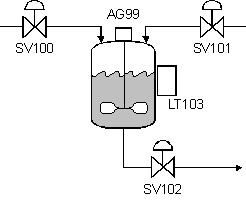
In the following example, the Device Control block is used to control a mixing agitator. The agitator is a three state motor: OFF, SLOW, and FAST. The agitator accepts two discrete input signals for state commands and provides two discrete contracts for state feedback indication.
To prevent foaming of the components being mixed, the operator is not permitted to start agitation until the tank level is 50% or greater. To prevent molecular breakdown, the mixing operation must not exceed 30 minutes when mixed at the slow speed or 15 minutes at the fast speed. After the components are mixed, the operator must be locked out from reactivating the agitator until the mixture is drained and the tank is refilled with the next batch of components.
The following figure shows an example of this mixing process:
The following figure shows an example function block diagram for this application.
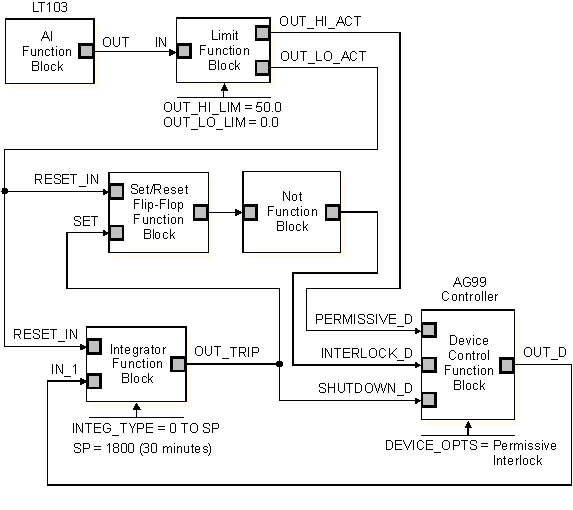
The Device Control function block's PERMISSIVE_D input is used to lock out operator agitator activation until the appropriate tank level is reached. The SHUTDOWN_D input is used to automatically shut off the agitator after the required mixing time has passed. The INTERLOCK_D input is used to lock out operator re-activation of the agitator until the tank mixture is drained. The Permissive and Interlock device options must be enabled.
The Analog Input function block reads the level indication in percent and the Limit function block monitors the level. When the level is greater than or equal to 50.0, the OUT_HI_LIM parameter transitions to True and provides the permissive that allows the Device Control block to be commanded to its SLOW or FAST state. When the tank is emptied, the Limit block's OUT_LO_LIM parameter is used to reset the integrator in preparation for the next mixing cycle. OUT_LO_LIM is also used to reset the latched mixing cycle completed signal (OUT_TRIP) generated by the Integrator function block.
After the tank is filled to the desired level, the permissive is satisfied and the operator can command the AG99 Controller to the SLOW or FAST state. The requested state is also the value written to the Integrator block, which is used to compute the mixing time based on the mixing speed. When the Integrator block reaches setpoint (after 15 to 30 minutes, based on the manually selected agitator speeds), its OUT_TRIP parameter is used to shut down the AG99 Controller through the SHUTDOWN_D parameter in the Device Control block. This same signal is latched to hold the controller at interlock until the tank is emptied, at which time the latch is reset.
This block logic allows the operator to stop agitation and to restart it in the middle of the mixing cycle without losing elapsed mix time. This is important if the AG99 agitator stops temporarily due to a motor overheating protection switch or a temporary loss of feedback indicators. When the problem is resolved, the agitator can be commanded back to the active mixing speed, picking up where it left off.
The following table shows the discrete I/O combinations used for the three agitator states.
|
Agitator Device Status |
Feedback Outputs |
Command Inputs |
||
|---|---|---|---|---|
|
First Output |
Second Output |
First Input |
Second Input |
|
|
OFF |
False |
False |
False |
False |
|
SLOW |
True |
False |
True |
False |
|
FAST |
False |
True |
False |
True |
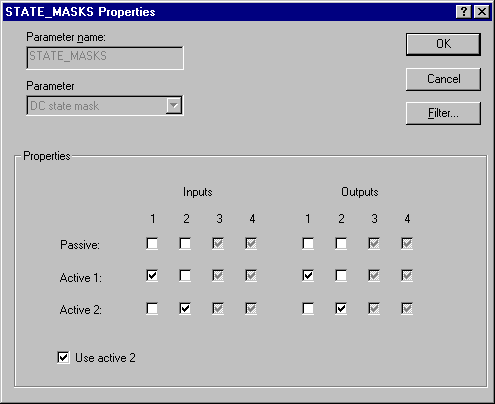
The following figure shows the STATE_MASKS parameter setting used to configure the device controller states for the agitator.