Use the LE function block to provide for operator input of offline lab analysis in a DeltaV system (for example, in a Neural Network module). You define all parameters in the LE block using Control Studio.
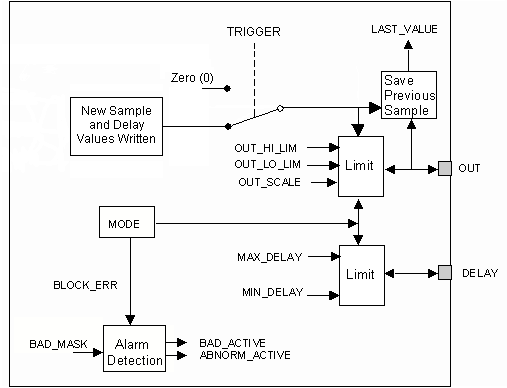
To provide an interface that operators use to enter lab analysis results, create DeltaV operator pictures that contain an LE dynamo for each LE function block. Operators use the LE dynamo to enter the lab analysis value and the time the grab sample was taken. The block computes the delay between the time the grab sample was taken and the time the operator entered the analysis results. If both the analysis value and the calculated delay are within their maximum and minimum ranges, the dynamo writes the sample value to the OUT parameter of the LE block and writes the calculated delay to the DELAY parameter of the LE block. If either of these values is outside its valid range, a dialog notifies the operator that the entry was not accepted. However, the maximum delay that affects the Neural Network block's automatic correction mechanism is established by the Time to Steady State configured in the DeltaV Neural application.
The LE block uses the OUT status limit attribute to indicate when an operator has entered a new lab sample. After an operator enters a new value, the block changes the OUT limit attribute from Constant to Not Limited for two block executions. Downstream blocks can use this status to detect when the OUT parameter contains the results of a new analysis.
The LE block supports mode and status handling.
The following diagram shows the internal components of the Lab Entry function block: