The following diagram shows the timed response of the Multiplexed Analog Input function block:
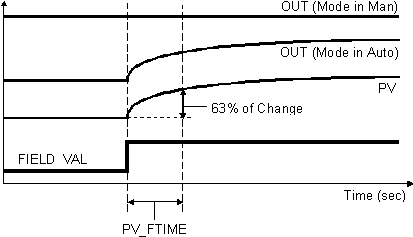
You select the manner of processing the analog measurement value by configuring signal conversion and filtering parameters.
Signal Conversion
You select direct, indirect, or indirect square root signal conversion with the linearization type parameter (L_TYPE).
The block applies transducer scaling (XD_SCALE) to the value from the channel to produce the FIELD_VAL in percent. The XD_SCALE units code must match the channel units code (if one exists), or the block remains in OOS mode after configuration. The OUT_SCALE is normally the same as the transducer, but if L_TYPE is set to Indirect or Ind Sqr Root, OUT_SCALE determines the conversion from FIELD_VAL to the output. PV and OUT always have identical scaling. OUT_SCALE provides scaling for PV. The PV is always the value that the block puts in OUT if the mode is Auto. If Man is allowed, someone may write a value to the output. The status prevents any attempt at closed loop control using the Man value by setting the Limit value to Constant.
Equations:
FIELD_VAL = 100 × (channel value - EU @ 0%) / (EU @ 100% - EU @ 0%) [XD_SCALE]
Direct: PV = channel value
Indirect: PV = (FIELD_VAL/100) × (EU @ 100% - EU @ 0%) + EU @ 0% [OUT_SCALE]
Ind Sqr Root: PV = sqrt(FIELD_VAL/100) × (EU @ 100% - EU @ 0%) + EU @ 0% [OUT_SCALE]
Direct signal conditioning — simply passes through the accessed channel input value (or the simulated value when simulation is enabled).
Indirect signal conditioning — linearly converts the accessed channel input value (or the simulated value when simulation is enabled) from its specified range (XD_SCALE) to the range and units of the PV and OUT parameters (OUT_SCALE).
Indirect square root signal conditioning — converts the accessed channel input value (or the simulated value when simulation is enabled) from its specified range (XD_SCALE) by taking the square root of the value and scaling it to the range and units of the PV and OUT parameters (OUT_SCALE).
You view the accessed value (in percent of XD_SCALE) through the FIELD_VAL parameter.
When the converted input value is below the limit specified by the LOW_CUT parameter and the Low Cutoff I/O option (IO_OPTS) is enabled (True), a value of zero is used for the converted value (PV). This option can be useful with zero-based measurement devices, such as flowmeters.
You can set the I/O option in Out of Service mode only.
Filtering
You apply filtering to the converted value (PV) by specifying the filter time constant (in seconds) in the PV_FTIME parameter. When you specify a value of zero, no filtering is applied.
Block errors
The following 16 conditions can be reported in the BLOCK_ERR parameter:
-
Other
-
Block Configuration Error: the selected channel carries a measurement that is incompatible with the engineering units selected in XD_SCALE, the L_TYPE parameter is not configured, or CHANNEL = zero.
-
Link Configuration Error
-
Simulate Active: Simulation is enabled and the block is using a simulated value in its execution.
-
Local Override
-
Device Fault State Set
-
Device Needs Maintenance Soon
-
Input Failure/Process Variable has Bad Status: The hardware is bad, or a bad status is being simulated.
-
Output Failure: The output is bad based primarily upon a bad input.
-
Memory Failure
-
Lost Static Data
-
Lost NV Data
-
Readback Failed
-
Device Needs Maintenance Now
-
Power Up
-
Out of Service: The actual mode is Out of Service.