The Multiply function block is used as a mathematical operator and often is used with other Math function blocks. You can use the Multiply block to convert a signal from one type of engineering units to another.
Application example: Signal conversion
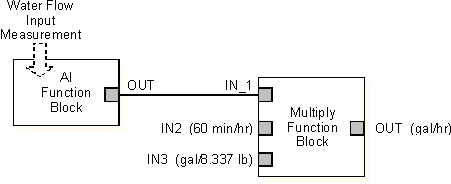
Assume a transmitter measuring water flow is calibrated in pounds per minute, but the operator needs the information in gallons per hour. You can use the Multiply function block to calculate the correct value in the proper units.
For this example, connect the input flow to IN1, set IN2 to 60.0 min/hr, and set IN3 to the specific volume of water (8.337 lb/gal). The block output reflects the multiplication of these values and units, as in the following equation:

For example, when the input flow (IN1) is 10 lb/min, the output value (OUT) equals 71.97 gal/hr. The following is the function block figure for this example:
Application example: Applying a gain value
You can also use the Multiply function block to apply a gain value to a signal. In this case, you connect the signal to IN1 on the block and configure a gain value of 2.0. OUT reflects the signal value multiplied by the gain value.