The following diagram shows the basic setup of the Ratio function block:
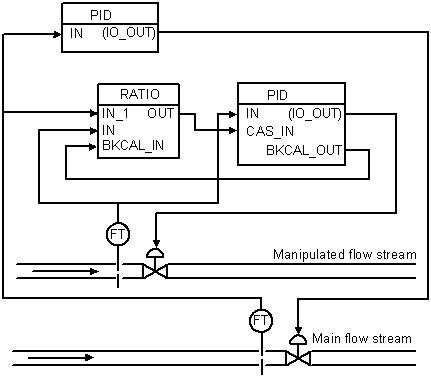
In this example, there are two flow streams: the primary (main) flow stream and the secondary (manipulated) flow stream. The primary stream's flow rate is set and governed by a conventional PID loop. The Ratio function block and its slave PID make the manipulated flow stream a specified fraction of the primary flow. The primary stream's flow rate is sent to the Ratio function block where the ratio setpoint is used to determine the desired flow rate of the manipulated stream. The output of the Ratio block is then cascaded into a slave flow controller for the secondary stream, where it is used as a setpoint for this stream.
The Ratio function block does not actually require the secondary (manipulated) flow rate. The input IN is optional. If this input is provided, it is used to calculate the actual ratio. This ratio is stored as the Ratio block's PV, which can be used for alarming.
In the above figure, it is implied that the Ratio function block runs in Automatic mode with the desired ratio set manually by an operator.
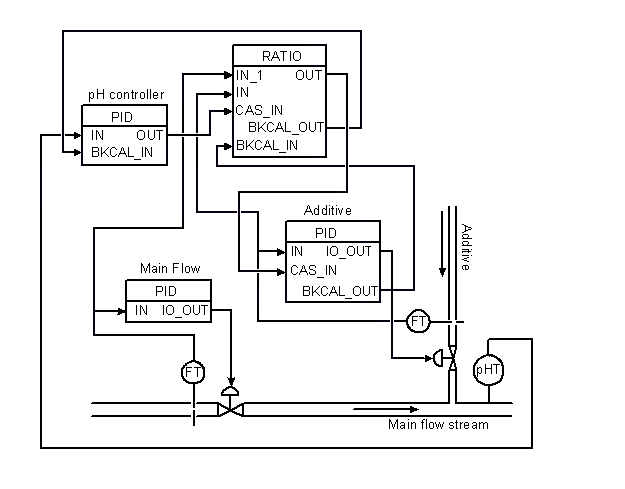
pH Control
The pH of a stream can be controlled by adding caustic or acid to a primary flow stream. The additive must be added in the proper ratio to get the desired pH. The setup in the following figure shows how this can be done using the Ratio function block.