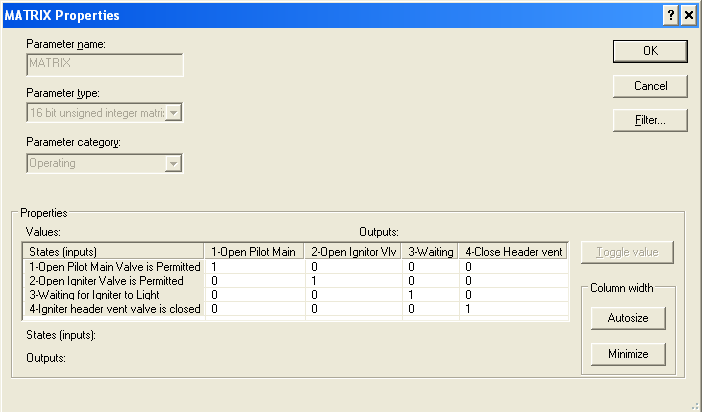
To configure an SEQ block, you can start by creating a table that associates all of the states allowed for the block with the possible outputs for the block. In the following table, a 1 in a cell indicates that when the block is in the state corresponding with the cell, the output corresponding to the cell is 1.
|
States (Inputs) |
Outputs |
|||
|---|---|---|---|---|
|
Open Pilot Main |
Open Igniter Vlv |
Waiting |
Close Header vent |
|
|
Open Pilot Main Valve is permitted |
1 |
0 |
0 |
0 |
|
Open Igniter Valve is permitted |
0 |
1 |
0 |
0 |
|
Waiting for igniter to light |
0 |
0 |
1 |
0 |
|
Igniter header vent valve is closed |
0 |
0 |
0 |
1 |
Now you can configure the states and outputs. Configure the number of states (inputs) using the NUM_STATES parameter. Configure the number of outputs by right-clicking the block and selecting Extensible Parameters.
Label the outputs by configuring DESC_OUTn. Label the states by copying, renaming, and editing $ctlr_std_seq_states (in DeltaV Explorer under System Configuration/Setup/Named Sets). The following figure shows the configuration of the named set My_seq_cfg for this application example.
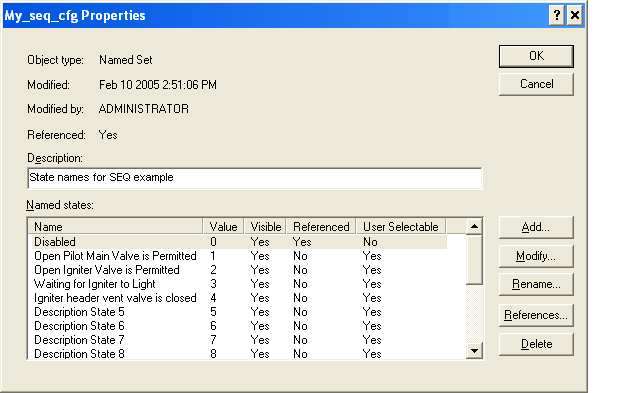
Do not rename or edit the Disabled named state. Leave the User Selectable setting to No.
Next, associate the named set with the SEQ block from the Properties dialog of the STATE parameter.
Finally, configure the MATRIX parameter to indicate which outputs should be triggered for each state as shown in the previous table.