You can use the Signal Generator function block to simulate a signal and to send the generated output to other blocks to test a control strategy. This block is also useful for simulating process disturbances for loop testing.
Application example: Testing
You can use the Signal Generator function block to perform configuration tests or to test alarms and user interfaces before startup. For example, when you want to simulate a temperature input with a range of -200 to 200°F, you configure the RAND_AMP parameter to 200. Next, you connect the Signal Generator block output signal (OUT) to an Analog Input (AI) function block SIMULATE_IN input, as in the following figure:
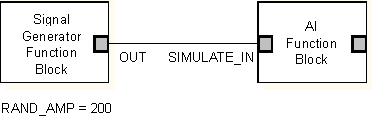
The Signal Generator function block generates a random value between -200 and 200. You can use these values to test how your control strategy responds to all of the possible input values. In addition, you can test the operator environment by seeing what happens when the generated signal to the AI function block exceeds a limit, triggers an alarm, and/or notifies the operator.