To configure help for an individual alarm, open the Alarm Properties dialog from DeltaV Explorer, Control Studio, or System Alarm Management.
You can also define help from the DeltaV Alarm Help View and Edit application. For more information refer to that application's help file.
First, you must enable Alarm Help in the General tab of this dialog. Depending on the type of alarm you are working on the tab on which the Enable Alarm Help check box appears may vary, but always looks similar to the following.
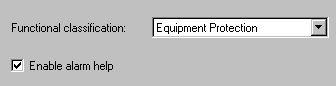
On the same tab you can also select a functional classification for the alarm from the drop-down list. The choices in the list are what were configured in the named set dv_alm_function. The alarm functional classification is visible in Event Chronicle records for alarms from other DeltaV zones. It is recommended that you coordinate the configuration of dv_alarm_function states for all DeltaV zones.
If you are configuring Alarm Help in a module class and you want to be able to modify help in instances of the class, you must select the Allow instance value to be configured check box on the class Alarm Properties dialog General tab.
An Alarm Help tab appears in the Alarm Properties dialog. The tab looks similar to the figure, though several of the labels may be different depending on if you modified the named sets associated with the fields. A few alarm types' Alarm Help tabs appear different, but the Alarm Help you configure will be similar for every alarm. For information specific to a particular Alarm Help tab, refer to its help.
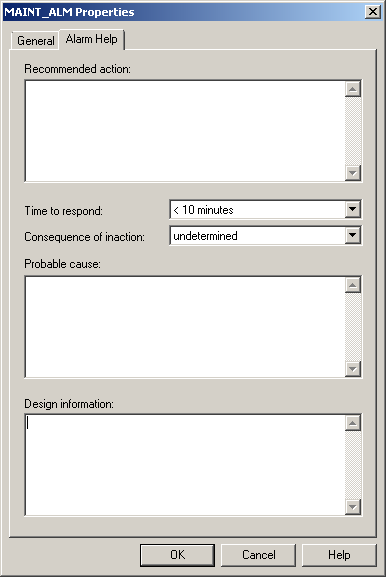
Select a Time to Respond and a Consequence of Inaction from the drop-down lists.
Enter text in the three text fields (you may have fewer fields depending on the configuration of the named set dv_alm_help_text).