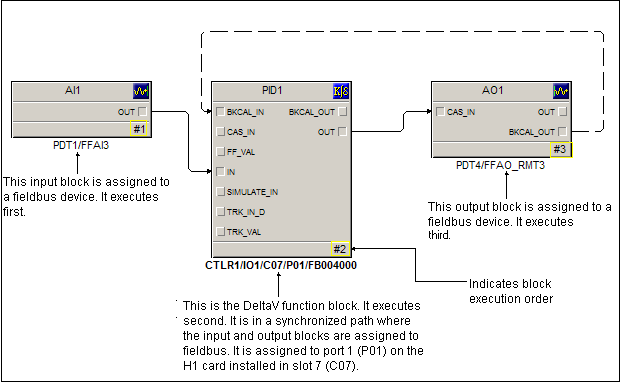
Refer to this simple module for an explanation of the requirements that must be met before automatic assignment can occur. The DeltaV function block (PID) in this module has been automatically assigned to the H1 card.
|
Requirement |
Explanation |
|---|---|
|
The DeltaV function block must be in a loop with a synchronized control path. A block is in a synchronized path if it is configured in a loop with at least one input block and one output block assigned to a fieldbus device. |
The PID block, the DeltaV function block in the simple module above, is in a synchronized control path. The AI block is assigned to a fieldbus device (PDT1/FFAI3) and the AO block is assigned to a fieldbus device (PDT4/FFAO_RMT3). The path (CTLR1/IO1/C07/P01/FB004000) provides a visual indication that the block is running in the H1 card, not in the controller. |
|
The function block execution order must be correct; it must follow the information flow in the control. |
The number on each block (yellow-highlighted in the example module) denotes the order in which that block executes in the module. The example shows a correct execution order that follows the flow of information: the AI block executes first, then the PID block executes second, and the AO executes third. Note The Set Execution Order command allows you to set the execution order. Tip Set the execution order before enabling Automatic Assignment. |
|
All the blocks in the loop must support automatic assignment or must be assigned to fieldbus. |
There are three blocks in this module. Two blocks are assigned to fieldbus devices (AI and AO) and one block (PID) supports automatic assignment. If this module contained a DeltaV function block that was not supported or one of the other blocks was not assigned to a fieldbus device, the system would not allow automatic assignment. |
|
The module's input and output links must be of the same parameter type. |
The input and output links in the example: OUT, IN, CAS_IN, and BKCAL_OUT, are all Floating point with status. The parameter type is visible in the Parameter View in Control Studio. It is highly recommended that you use the Parameter View to ensure that the input and output links are of the same type. |