A newly created SIS module can define as a property the faceplate display SIS_MOD_WIDE_fp. The same is true for the module template SIS_DEFAULT, which also has two standard alarm parameters, BYPASS_ALM and IO_ALM. SIS_MOD_WIDE_fp is a wider version of the SIS module faceplate and shows the alarm description in its active and suppressed alarms lists.
The SIS module wide faceplate opens in runtime using the same techniques as those for control modules. The following image shows an example of the SIS module wide faceplate in run mode.
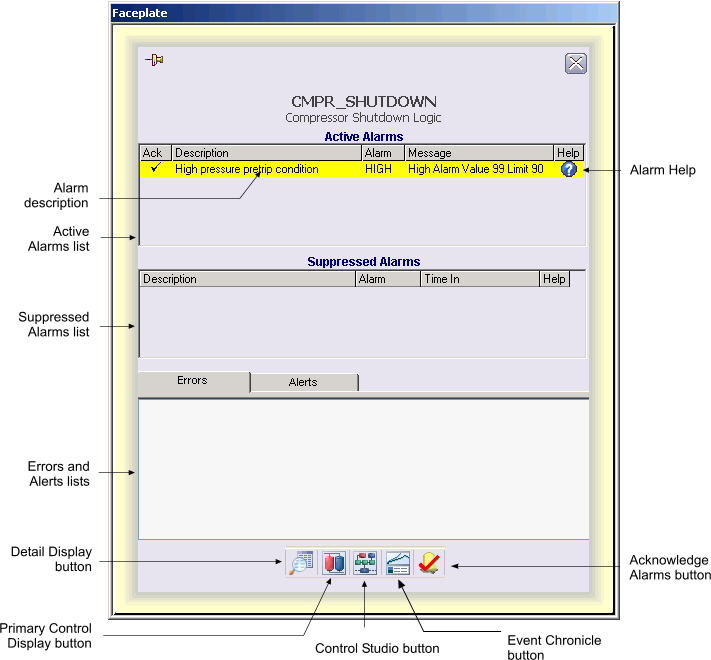
The SIS module wide faceplate consists of a main display area, a "close picture" button, a pushpin button, the SIS module tag and description, the alarm description, command buttons, and an Alarm Help button. The pushpin button appears when multiple faceplate capability has been enabled in UserSettings.grf. When multiple monitor capability has been enabled, a position button appears to the left of the pushpin.
The main display area of the SIS module wide faceplate contains an active alarm list and suppressed alarm list, and a tabbed control with two tabs, Errors and Alerts. The Errors tab lists text strings associated with active bits in SIF_ERRORS. The Alerts tab lists text strings associated with active bits in SIF_ALERTS. An indicator bar is visible under the word Errors or Alerts when one or more applicable bits are active.
You can open the SIS module wide faceplate in DeltaV Operate run mode by clicking an SLS alarm button in the Alarm Banner or clicking the Open Faceplate button on the Toolbar and typing the SIS module name.
The following items are contained in the SIS module wide faceplate:
-
Active Alarms list - Contains the currently active or unacknowledged alarms along with the alarm description, alarm message and an indicator that shows if the alarm has been acknowledged.
-
Suppressed Alarms list- Contains the alarms that are currently suppressed (either shelved, out of service or both) along with the alarm description and the time they were suppressed.
-
Errors and Alerts lists - Lists text strings associated with SIF_ERRORS or SIF_ALERTS.
-
Toolbar- Click the icons from left to right to perform the following functions, respectively:
-
Alarm Help- Opens the Alarm Help configured for an alarm.