The Synchronize Configuration command synchronizes the configuration of the DeltaV system with the asset server. Any differences between the DeltaV system and the asset server are changed on the DeltaV system. Synchronization does not affect the configuration of the external asset system. Right-click the Asset Server and select Synchronize Configuration to open the Synchronize Configuration Wizard. Use this wizard to make decisions about new assets that have not been added to the DeltaV system and old assets that no longer exist on the External Asset Server. Be sure to read the help text in the left pane of every screen. Successfully completing the wizard builds the Plant Hierarchy structure.
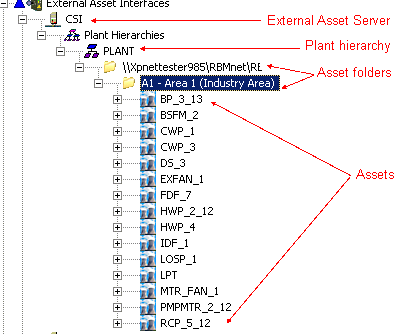
The following figure shows a plant hierarchy that was built in the DeltaV Explorer under the Application Station after the server configuration was successfully synchronized with the DeltaV system.