If you use the default setup, the Alarm Help View and Edit application looks like the following figure. DeltaV Alarm Help does not require set up, but it is highly configurable. The following figure indicates the default appearance of the application.
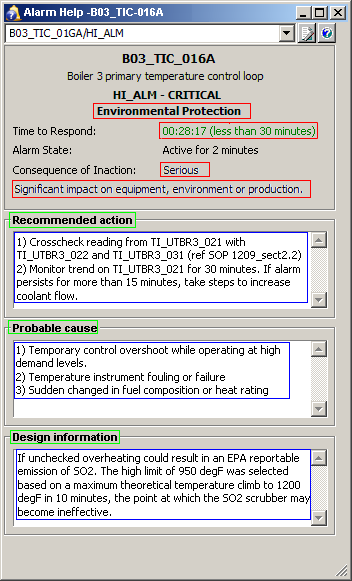
The text in the Alarm State field is determined by the value of the Alarm's parameter fields:
-
If the alarm parameter cannot be read (for any reason: not communicating, no longer configured, and so on) the alarm state indicates Unknown.
-
Else if the alarm is currently shelved by an operator (alarm.OPSUP is True) the alarm state indicates Suppressed.
-
Else if the alarm is currently removed from service (alarm.OOS is True) the alarm state indicates Suppressed.
Else if the alarm is currently disabled (alarm.ENAB is False) the alarm state indicates Disabled.
-
Else if the alarm is currently inactive (alarm.CUALM is False) the alarm state indicates Inactive. The alarm may still be in active alarm lists and alarm banner displays as an Inactive/Unacknowledged alarm.
-
Else if the alarm is active (alarm.CUALM is True) and the alarm can appear in alarm lists for the current user and workstation session, the alarm state indicates Active for %d days %d hours %d minutes (where %d is replaced by the current value) between current time and the alarm’s Time In time.
-
Otherwise the alarm state indicates Active.
Most of the other fields can be modified. The color outlines on the figure show the objects in the application you can modify. The green outlined fields indicate labels for the text fields. The red outlined fields are items in drop-down lists. You can configure the text in both the labels and the drop-down lists by modifying named sets.
The text fields outlined in blue are filled from text you enter in Alarm Properties dialogs.
Alarm Help is available across zones in read-only mode; it must be configured or modified in the system where the alarm originates.