After you configure Alarm Help you must download it for it to become available to users.
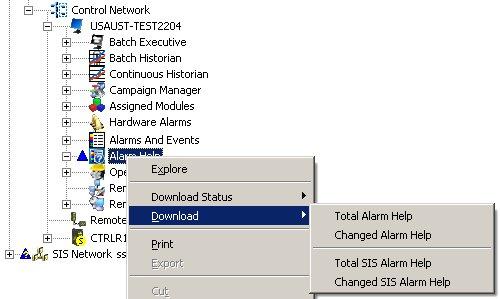
If you have sufficient privilege, from DeltaV Explorer you can download:
-
Total Alarm Help — Download all non-SIS Alarm Help in the DeltaV System.
-
Changed Alarm Help — Download only the changed non-SIS Alarm Help in the DeltaV System.
-
Total SIS Alarm Help — Download all SIS Alarm Help in the DeltaV System.
-
Changed SIS Alarm Help — Download only the changed SIS Alarm Help in the DeltaV System.
Operators and other users with sufficient privilege can download Alarm Help for an individual alarm from the Alarm Help View and Edit application. Information on how to do that is contained in the help for the application.
The following table summarizes the conditions and keys that determine if a user can download Alarm Help.
| Conditions and Keys | Condition State | ||||||
|---|---|---|---|---|---|---|---|
|
Key for SIS_ALARM? |
* |
No |
No |
No |
Yes |
Yes |
Yes |
|
Key for ALARM_HELP_DOWNLOAD? |
* |
Yes |
* |
No |
* |
* |
* |
|
Key for DOWNLOAD_CONFIG? |
* |
* |
Yes |
No |
* |
* |
* |
|
Key for SIS_ALARM_HELP_DOWNLOAD? |
* |
* |
* |
* |
Yes |
* |
No |
|
Key for SIS_DOWNLOAD_CONFIG? |
* |
* |
* |
* |
* |
Yes |
No |
|
Alarm Help Download Allowed? |
No |
Yes |
Yes |
No |
Yes |
Yes |
No |
|
* This condition is ignored |
|||||||