Standard alarms use alarm calculations that are predefined in the DeltaV function blocks. You can select which of the alarm calculations you want the module to detect and present to the operator. For example, if you want only HI and LO alarms, select only those two. The module does not detect the other potential alarms.
Function Block |
Standard Alarms |
|---|---|
AI, Pulse Input, and Manual Loader function blocks |
HI, HIHI, LO, LOLO |
DI function block |
DISC |
PID, Fuzzy Logic Control, Alarm, and Ratio function blocks |
HI, HIHI, LO, LOLO, DV_HI, DV_LO |
An example of a predefined alarm calculation is the HI alarm on the AI (analog input) function block. The HI alarm compares the PV to a limit value as follows:
HI alarm is true if PV > Alarm Limit (HI_LIM)
To create a standard alarm, right-click the function block on the diagram in Control Studio, and then click Assign Alarm. On the Block Alarms dialog, select the alarms you want to use. The system provides default information, including the name of the alarm, the alarm limit, and the alarm priority.
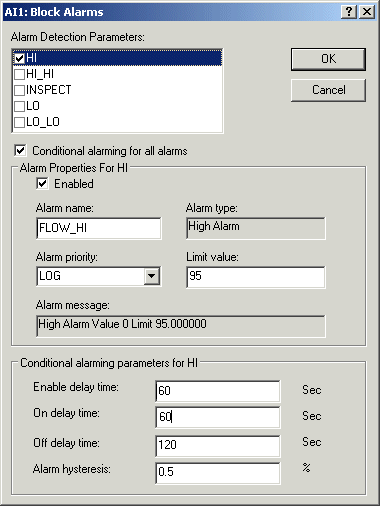
After you select the alarm, you can rename it. You can use any name that makes sense for your application, such as FLOW_HI. When the alarm is active, the system displays this name in DeltaV Operate and includes it in the Event Chronicle. Because FLOW_HI is a module parameter, it is displayed with a bell icon in the alarm window of Control Studio and in the DeltaV Explorer hierarchy.
You can also modify the default alarm limit and alarm priority. The alarm limit is the value above which you want FLOW_HI to activate an alarm. The alarm priority determines the color, sound, and importance to the operator. You must decide how important the FLOW_HI alarm is to your plant operation, as compared to the other possible alarms that could be occurring.
Finally, you can make each standard alarm conditional by selecting the Conditional alarming check box. The Conditional alarming check box extends the block alarm parameters, enabling you to use time delays or additional process conditions to avoid unnecessary alarms. Selecting this check box makes all of the standard alarms conditional.