Alarms and events > Alarm configuration

Configuring alarms on option bitstring parameters

DeltaV software supports alarming on individual bits of function block and module bitstring parameters such as MERROR. 

For example, to configure an alarm controlled by one or more bits of the MERROR parameter, do the following:

  1. With the module open in Control Studio, right-click in the Alarm View and select Add

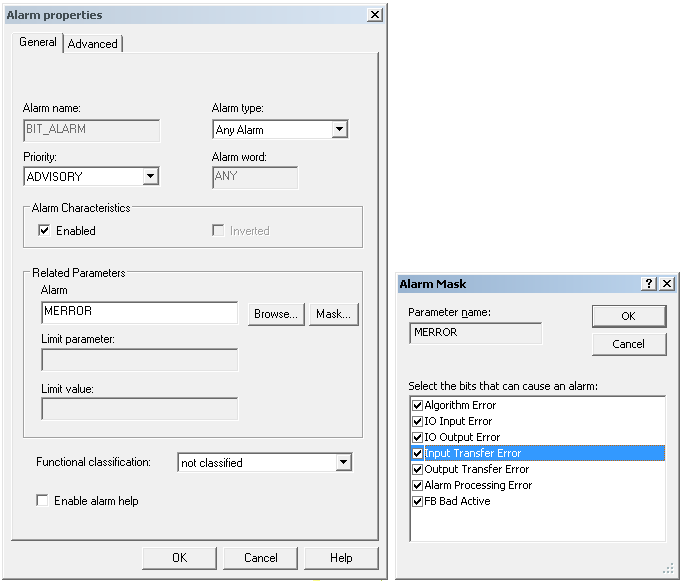
    The Alarm Properties dialog appears. 

  2. Select an alarm type.
  3. Enter or browse to the module's MERROR parameter. 

    Because MERROR is a bitstring parameter the Mask button appears next to the Browse button.

    Note

    The Mask button appears only when a bitstring parameter that supports alarming on individual bits is selected.

  4. To select the bits that cause the alarm to become active click the Mask button.

    The Alarm Mask dialog opens.

    The Alarm Mask dialog contains check boxes for all of the bits of the currently selected parameter.

  5. Select the bits you want to activate this alarm. If any of the conditions you select become active, the alarm becomes active.
  6. Close the Alarm Mask dialog. 
  7. Select a Functional classification for this alarm.
  8. If you want operators and other users to have access to alarm help, select the Enable alarm help check box. 

    This check box adds an Alarm Help tab to the Properties dialog.

  9. On the Advanced tab, enter optional alarm message parameters and set the alarm shelving timeout.

    Setting the three alarm shelving timeout fields to zero (0) disables alarm shelving. 
  10. Close the Alarm Properties dialog.