When you create a Slot from a Profibus Library module to which a signal was added, the signal and a DST are created below the Slot in the DeltaV Explorer hierarchy. The DST is marked with a yellow tag. A default DST name (for example PDT2S000AL1 in the following figure) is automatically assigned but it can be renamed so that it is meaningful in your control strategy.
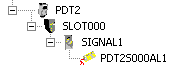
A DST is a unique name that represents a specific signal from the device. The signal is used in the control strategy. At the Slot level, you can customize the DST name and modify the signal properties for that device. Remember that any modifications made to the signal at the Slot level do not affect the Profibus Library module that contains that signal. If you have previously configured a DST, you can browse for it and assign it to a signal.