Virtual I/O Modules (VIM)
>
Configure VIM serial cards and ports
Configure a port for VIM
In DeltaV Explorer right-click a card port and select
Properties
.
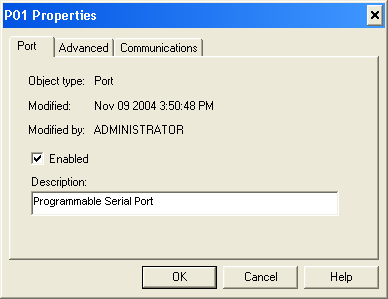
On the
Port
tab, select the
Enabled
check box and enter a description, if desired.
Note
Enable only the ports you are using. Do not enable unused ports.
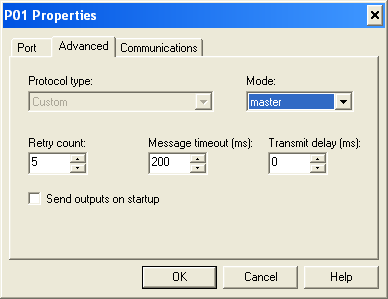
Open the
Advanced
tab.
On the
Advanced
tab:
In the
Mode
field, select
Master
.
Select values for the
Retry count
,
Message timeout
, and
Transmit delay
fields. For most applications configure the port as shown above.
Do not select the
Send outputs on startup
check box.
Open the
Communications
tab. The fields on the
Communications
tab are not used. Accept the default values and click
OK
.