Serial devices and the DeltaV system > Using serial data in control strategies
Write a display setpoint to a specific register
-
Create a module containing an Internal Write parameter (located on
the Special Items palette).
-
Modify the Internal Write parameter properties by selecting a
parameter type of External Reference.
-
For the
External parameter path field, click
Browse.
-
In the
Browse dialog, select
System Configuration in the
Look in field.
-
Select
DST Parameters in the
Object Type field.
-
Starting at Physical Network, drill down until the dialog contains
DSTs. The list includes dataset tags.
-
Double-click the dataset tag that contains the parameter
(register) that corresponds to the dataset value that you want to write to.
-
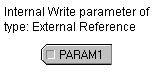
Double-click the parameter. This parameter can be linked to a
display's input data field. The result in Control Studio looks like this: