The DeltaV InSight selections for on-demand and adaptive tune are suitable for tuning most control loops. Because it is flexible and easy to use, these tuning tools in DeltaV InSight require little initial setup. However, to achieve the best results with InSight, adhere to the guidelines specified in the following sections.
Tuning Rules
To obtain proper tuning results, observe the following basic rules:
- Equipment must be in good operating condition.
- Studies on thousands of loops showed that valve problems cause 30 to 35 percent of loop tuning problems. This means that one out of every three loops needs valve improvements to make proper loop control.If the calculated values seem out of the ordinary, this might indicate valve problems. If the gain of the calculated values is too high or the reset is too small, check your valves. Many valves experience the stem's sticking or hysteresis in movement that cause improper model identification and loop tuning.
- Before tuning a loop using on-demand tuning, the loop must be stable. When initiating testing, on-demand tuning allows you to start the test when the difference between the SP and the PV is large. However, to achieve optimal results, make sure that PV is close to SP before you start tuning.
- If the SP and PV values are not close, a warning is issued when Test is initiated. After you select Force, the identification continues.
- The Step size for adaptive and on-demand tuning must be large enough for the change to be reflected in the controlled parameter.
- The setpoint or output (OUT) change defined for adaptive tune or for the output (OUT) change (or Step size) for on-demand tune must cause an appropriate change in the PV. If the change in the PV is not large enough, the tuning process will not be successful. A process model might not be observed under the following conditions: If a process model is not identified, check for those things that might affect the process response to change in OUT (for on-demand or adaptive tuning) or setpoint (for adaptive tuning).
- Your process must be able to handle the step change required for tuning.
- When using on-demand tuning or the inject change feature of adaptive tuning, make sure that the step change does not cause a relief valve to open or any interlocks to be triggered, either of which could affect the tuning results.
- When using either on-demand or adaptive tuning, neither the SP, the PV, nor the output (OUT) should be near its limits.
- When a process model is identified, the SP and PV should not be within 10 percent of the loop's engineering unit limits and the output (OUT) should not be within 10 percent of the configured limits. If these values are outside of the specified range, the process response could be affected and the calculations of loop dynamics would be inaccurate.
Selecting a Controller Design
The on-demand and adaptive tuning features of DeltaV InSight provide a wide choice of tuning rules and features that can be used to provide the best tuning for a loop. Here are some general guidelines:
- After you change tuning values, observe the loop for a period of time to see its reaction to noise, disturbances, or small SP step changes.
- If the loop performance is not satisfactory, first change the speed of response (Faster or Slower). If you are using On-Demand tuning, you can modify the process type selected for the tuning rule. Also, you can click the Expert button to use an advanced tuning rule.
- If the loop performance is still not satisfactory, you can try an alternative process type or the Expert tuning selection (using the same process model).
General guidelines for tuning rule selection:
- The PI design is the most common choice for flow, liquid level, and gas pressure control.
- PID control, along with feedforward and cascade strategies, is often used for temperature control, pH control, and composition control. (The composition control might require some limits on derivative action.)
- If you have tuned a loop by trial and error and it works well, you might consider using the tuning recommendations to verify your settings and tune your loop more precisely. If the values calculated by on-demand or adaptive tuning are drastically different than your trial and error values, consider the new values closely before changing block tuning parameters.
- The PID designs are limited for some applications. For example, if the ratio of the time delay of a loop to time constant exceeds 1, the PID performance cannot be guaranteed. The tuning results must be carefully verified. If the response is not acceptable, you might need to modify the tuning results. For such applications, using the Smith predictor for control (that can be commissioned using on-demand tuning) might provide better results.
- The process response for the recommended tuning provided by on-demand or adaptive tuning can be viewed by selecting Simulate. This response should match what you see after applying the recommended tuning if the identified model accurately reflects the process gain and dynamics.
Application Examples
This section provides some general application examples to help you use adaptive and on-demand tuning to commission your process loops. The following sections provide examples of a single feedback loop, a cascade control loop, and a feedforward control loop.
Tuning a Single Feedback Loop
For an example of tuning a single feedback loop, refer to the temperature loop in the following figure. In this example, steam is fed into the heat exchanger, and water is passed through a header in the steam heater. The water absorbs heat from the steam.
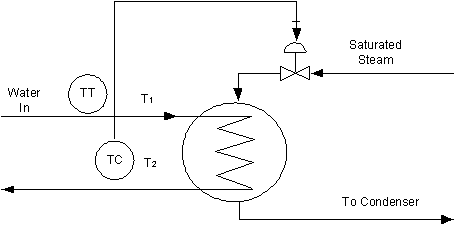
In the Tuning Calculation panel, the process type should be Temperature for on-demand tuning. You would probably start tuning this loop with a Normal loop response setting, unless the loop has some unusual characteristics. If you select the Expert button or are using Adaptive Tune, you should start tuning with a tuning rule for PID.
After tuning the loop and placing it in operation, observe the response to SP changes and load disturbances caused by process upsets. If the loop demonstrates too much overshoot, first try changing the loop response to SLOW and update the tuning. If you still experience too much overshoot for the process, you can select a different advanced tuning rule with lower gain. You can experiment with different tuning rules or factors using a tuning rule such as Lambda factor until you get the results you want.
Tuning Cascade Control Loops
You can use adaptive and on-demand tuning to commission cascade control loops. However, because the loops for cascade control are interactive, you must identify the process and apply the recommended tuning in a particular order. You need to tune the secondary (or slave) loop first and the primary (or master) loop last. For example, refer to the cascade loop for controlling level in the following figure. The primary loop controls the level. The secondary loop controls the inlet flow.
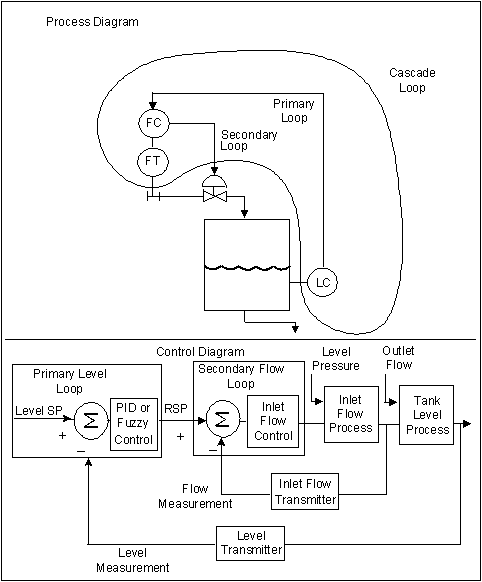
Perform these steps to use InSight to tune the cascade control loop in the above figure:
On-demand Tuning
Adaptive Tuning
- Examine the models that have been identified for the secondary loop. If these are consistent, apply the recommended tuning to the secondary loop.
- After applying the secondary tuning, wait until new models are identified for the primary loop (since the secondary tuning impacts the process model identified for the primary loop).
- Examine the models that have been identified for the primary loop. If these are consistent apply the recommended tuning to the secondary loop.
Use these same steps for tuning most cascade loops.
Tuning Feedforward Control Loops
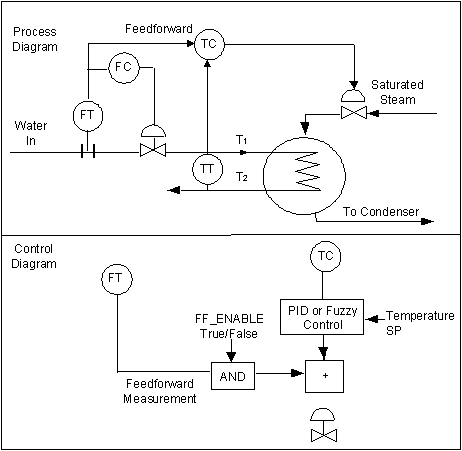
You can tune the feedback portion of a feedforward control loop using on-demand or adaptive tuning but best results are achieved if the feedforward value is fairly consistent during the time the model is identified. Begin with the Normal dynamics setting.
The temperature control feedforward loop in the following figure is similar to the single-loop steam heater example, but the flow rate for the water flowing into the heat exchanger is fed forward to the temperature controller.
To use InSight to tune the feedforward control loop in the following figure, perform these steps:
On-demand Tuning
- Disable the feedforward portion of the loop and hold the input constant.
- Typically, you can disable the feedforward input by changing the FF_ENABLE parameter of the block from True to False.
- Using InSight, tune the control loop as if it were a single feedback loop.
- Return the feedforward portion of the loop to normal operation by setting FF_ENABLE parameter of the block to True.
Adaptive Tune
Use the same procedure to tune most feedforward control loops.
The guidelines and examples contained in this section are suggestions for typical control loops. Select the approach that is best for your particular application.