The MPC Operate and Operate Pro faceplates are actually standalone applications. The MPC Operate application is one of the tools included in DeltaV Predict.
Operators use MPC Operate to view and interact with the control strategy implemented with the MPC function block.
Similarly, the MPC Operate Pro application is a tool included in DeltaV PredictPro. Operators use MPC Operate Pro to view and interact with the control strategy implemented with the MPCPro function block.
The following figure and explanation are for the MPC Operate application. The MPC Operate Pro application is similar but has some additional features.
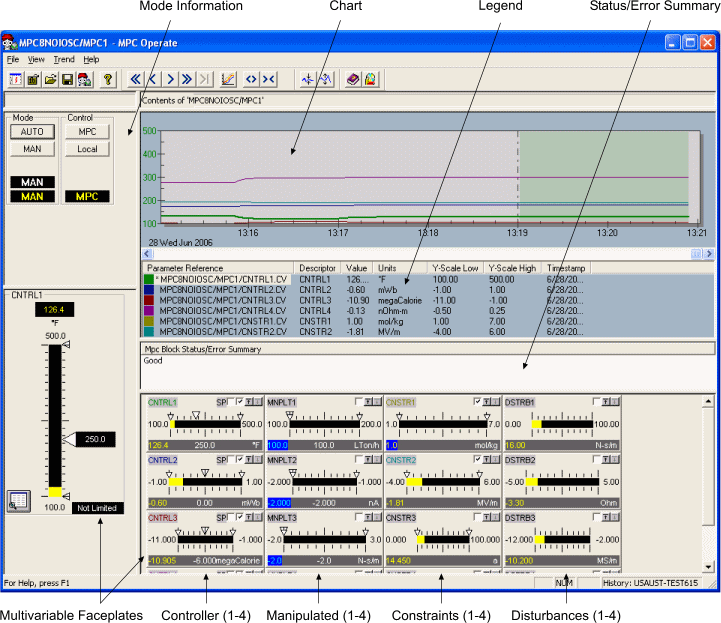
The trend shows the previous values as well as the predicted value of controlled or constraint parameters. To add or delete a parameter from the trend, either check or clear the check box on the small faceplates shown below the trend. When you click one of the small multivariable faceplates, a larger faceplate of the associated parameter is provided in the left panel of the display. You can make changes in operating targets of controlled or manipulated parameters from this larger faceplate. The Detail button permits limit and tuning parameter changes for each MPC parameter. Also, by selecting the MPC button in the Control pane, you can request that all downstream blocks go to a remote mode that allows the output of the MPC function block to be used as the block setpoints in the Man and Automatic mode of operation.