This PID loop module uses a modified Smith Predictor for PID control with deadtime compensation. Use this module template if your self-regulating process is deadtime dominant, that is, its deadtime is about the same or greater than the process time constant.
Theory of operation
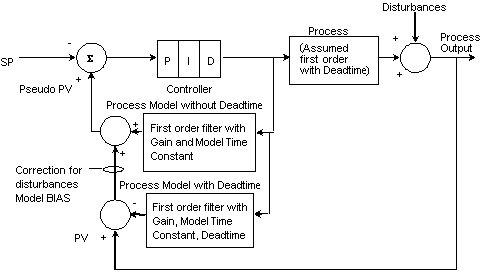
With a Smith Predictor, the control actions are calculated based on the predicted process response to a change, with and without the deadtime. The Smith Predictor first models the process as a first-order equation without deadtime. The predicted process variable is calculated and sent to the PID block as a pseudo-process variable.
To compensate for the disturbances in the process, the actual process variable with deadtime is added to the feedback loop. The Smith Predictor calculates the model error by taking the difference between the actual process variable and the model process variable. After it calculates the model error, a Smith Predictor adjusts the model bias according to the magnitude of the disturbance. The following figure contains a representation of the Smith Predictor control.
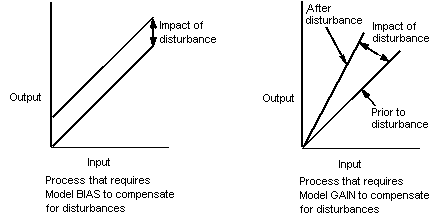
This text so far has explained a standard Smith Predictor, but the DeltaV PID_DEADTIME module uses a modified Smith Predictor. In addition to the capability of the standard Smith Predictor, the modified Smith Predictor can adjust the model gain instead of the model bias, if the primary process disturbances are proportional in nature. The following figure shows the change in the output caused by a disturbance when a bias correction is needed versus when a model gain correction is needed. You must decide which correction is best for your process based on the type of disturbances you have. For example, a disturbance in the feed temperature of a heat exchanger does not change the process gain, it merely results in a bias to the heat required to maintain the outlet temperature. However, a disturbance in the feed rate to that heat exchanger results in a change in the process gain. If the more significant disturbance is feed temperature, use Bias as the correction type. If feed rate is the more significant disturbance, use Gain as the correction type.
If the model process variable with deadtime accurately reflects the actual process, the model output cancels the process feedback signal. Under these conditions, the closed loop characteristics are only a function of the PID block and the process model without deadtime. The control is improved because deadtime is eliminated from the feedback signal used for control.
Model error and process disturbances can cause the model process variable with deadtime to deviate from the actual process. The modified Smith Predictor allows you to limit the amount of model error correction provided. The error correction limit should be set greater than the contribution of the typical disturbance to the process measurement, yet small enough to protect against potential instrumentation problems.
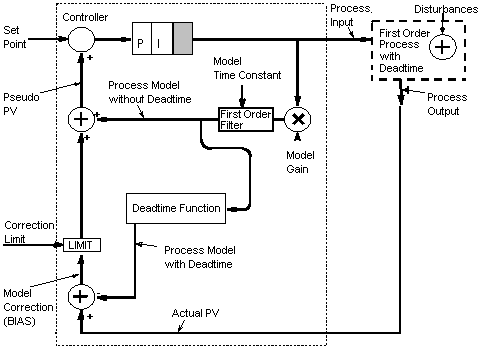
The following figure shows a representation of the modified Smith Predictor with model BIAS and correction limiting.
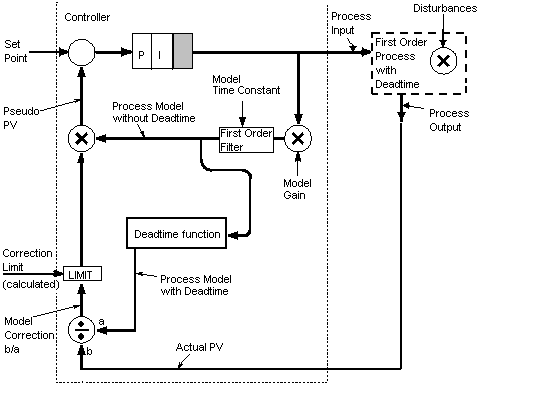
The following figure shows a representation of the modified Smith Predictor with model GAIN and correction limiting.
Configuration
To configure a PID with deadtime compensation module, create a module from the module template PID_DEADTIME using the DeltaV Explorer. You can use the DeltaV Explorer or Control Studio to customize the module's properties and configuration parameters. There are configuration tips in the function block diagram of the module in Control Studio. Refer to the Quick Configuration Parameter table below for PID_DEADTIME.
Enter the process model parameters (model GAIN, model TIMECONST, and model DEAD_TIME) if they are already known. If not, they can be entered from the detail display in DeltaV Operate or DeltaV Live, after you have done the open-loop step testing. Because the module uses a modified Smith Predictor, you must also configure the CORRECTION type you want for your process disturbances (model GAIN or model BIAS) and the correction LIMIT.
Note that the I/O Reference parameter for the process variable input is configured using IO_IN in the AI function block, not in the PID block.
Scaling information for the process variable must be entered in three parameters, AI1/OUT_SCALE, PID1/PV_SCALE, and SCLR1/OUT_SCALE. Typically, the value of the fields in all three parameters should be the same. However, an offset can be applied to EU0 and EU100 in SCLR1/OUT_SCALE if there is model offset at steady state when SCLR1/OUT_SCALE has the same values as AI1/OUT_SCALE and PID1/PV_SCALE. In some processes the relationship between the PID output and the process output is linear but has a fixed offset. This means that at steady state the correction term that is calculated by subtracting the predicted process variable from the actual contains this offset value. This causes a problem when a model limit is applied that is similar to or smaller than the offset. If necessary, set the offset in EU0 and EU100 to be the same as the process offset so the value of the correction term is 0 at steady state.
Use the following guidelines when you configure alarm condition parameters in this module. Configure the alarm hysteresis value and the HI, HI_HI, LO, and LO_LO limit values in the AI function block. Configure the deviation limit parameters in the PID function block.
The PID_DEADTIME module template supports variable deadtime compensation. You can improve the control performance if the process deadtime is variable and can be calculated, for example, as a function of the process throughput. Calculate the actual process deadtime in another control module and write the value to the DEAD_TIME parameter in the DTC composite block in your deadtime compensation module.
To configure DeltaV Operate for this module, place the PID DT COMP dynamo on your control display. To configure DeltaV Live for this module, place an instance of the HP_MA1_N_ GEM class on your display. The faceplate and detail display names are pre-defined as module properties. The faceplate is essentially the same as the standard PID loop faceplate. The PV field is from the AI function block rather than the PID block because the PID block PV is the pseudo-PV when deadtime compensation is enabled. The detail display is unique for modules created from the deadtime compensation module template. For more information on the specific detail display, refer to the DTC_dt detail display topic.
Tuning the modified Smith Predictor
When tuning the modified Smith Predictor, you first must identify a first order plus deadtime model of your process. You can use Tune with InSight or perform a manual step test to develop the model. If you are using Tune's On-demand or Adaptive tuning to develop the model, disable DT Comp and use Tune for On-demand Tuning or enable Process Learning for Adaptive Tuning to identify the first order plus deadtime process model.
Optionally, you can perform one or more open loop step tests to determine the gain, time constant, and deadtime of the process. The values must be accurate to within 25 percent of the actual process values. Apply model parameters (for example, deadtime, time constant, and gain to the DT Compensator).
Do not update the PID controller with PID parameters provided by Tune. Instead, use one of the following methods:
After you enter the deadtime compensation parameters, setting the PID block tuning parameters is straightforward. With deadtime compensation enabled, the loop is tuned as if the process is without deadtime. Only set the GAIN and RESET values in the PID block for a loop with deadtime compensation. Set the RATE to 0.
Configure RESET to be equal to the model TIMECONST value. PID block GAIN can be adjusted to get the desired closed loop response. The initial PID block GAIN can be set as a function of the model GAIN. Setting the PID block GAIN equal to the inverse of the model GAIN (PID GAIN = 1 / model GAIN) results in a closed loop time constant equal to the open loop time constant. Make sure that the closed loop time constant is longer than the open loop time constant to reduce sensitivity to model error. Therefore, reduce the initial PID block GAIN by 30 percent or more (PID GAIN = 0.7 / model GAIN).