A Sequential Function Chart (SFC) is a diagram that defines the sequence of events with steps, transitions, and actions. Sequential Function Charts (SFCs) are useful for representing and controlling sequential processing behavior. They are best at controlling strategies that require multiple states. SFCs are made up of steps, transitions, and actions. You can define a specific task you want to perform by graphically representing the steps, transitions, and actions involved.
A sequence in an SFC is drawn as a series of steps and transitions. Steps are represented by boxes and transitions by vertical lines with crosses attached. Each step contains a set of actions that affect the process. At any given time, one or more of the steps and transitions can be active. Each time the SFC scans, the active steps and transitions are evaluated. When a transition evaluates as TRUE (for example, the transition condition is met), the steps prior to the transition are made inactive and the step(s) following the transition become active. This way, the SFC can sequence through the various control states defined by the module's diagram.
Transitions allow single-stream or parallel execution of logic within the SFC. Standard modes and commands for controlling SFCs are provided within the standard structure of the DeltaV system.
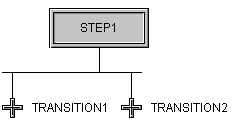
In an SFC, you can use divergent paths to enter alternative sequences by using a sequence select divergence, which looks similar to the following:
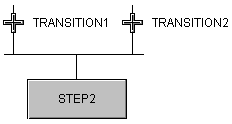
To converge paths again, you use a sequence select convergence, which looks similar to the following:
You can also execute simultaneous, or parallel, sequences by using a parallel divergence, which looks similar to the following:
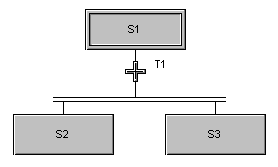
A parallel convergence brings the parallel sequences back together.
Once defined, the SFC can be executed. None of the pre-engineered modules in the DeltaV system library have SFCs because they are very specific to your application.
To create an SFC, first identify the steps (and actions) you want to take place. You control the flow from one step to the next using transitions. Transitions identify conditions that must be met before a sequence can proceed to the next step.
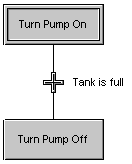
If you want to fill a tank, for example, you could have a task that consists of two steps: Turn on the pump that fills the tank, and turn off the pump. However, you might not want to turn off the pump before the tank is full. The following figure shows this single sequence. The transition from Step 1 (Turn Pump On) to Step 2 (Turn Pump Off) takes place only when the transition condition (Tank is Full) is met.
The SFC is downloaded in the active state, so you might want to begin the SFC with a STOP or WAIT step.
When you have an SFC with a termination and you make a connection from the termination back to the initial step, the termination acts like a transition. Once the transition condition is met, the sequence continues on at the initial step.
When you want a transition or action to wait for a period of time, you could use the TIME parameter of the module. To insert the TIME parameter in your expression, you must Browse the LOCAL parameters of the module.