OPC Unified Architecture (OPC UA) and the DeltaV system

Create a DeltaV OPC UA client

Note

This task describes how to create a DeltaV OPC UA client without security features. Refer to the related information for information on OPC UA security.

  • To create a working client, you need to know the endpoint URL of the associated OPC UA server. Record the server’s opc.tcp protocol URL before creating a client. To obtain the url of a DeltaV server:
    • For DeltaV workstation servers, click the OPC UA Server subsystem in the left pane of DeltaV Explorer. The right pane displays the opc.tcp endpoint url. Right click the endpoint and click Properties. Copy the url from the dialog.
    • For DeltaV PK controller servers, click the OPC UA Server subsystem in the left pane of DeltaV Explorer and right-click Properties. Click the Advanced tab and copy the endpoint url.
    Note

    The endpoint URL is not contained in the OPC UA server's FHX file. To reconstruct the URL, you can use the node's information in this format: protocol://machine:port/path. For example, opc.tcp://192.168.1.2:4880/DVOpcUaServer (where 192.168.1.2 is the node's IP address. For workstation-based OPC UA servers, the hostname (the node's computer name) is valid in place of the IP address).

  • For EIOC clients, the port protocol must be OPC UA. To set the protocol, open the EIOC port properties in DeltaV Explorer, click the Advanced tab and select OPC UA under the Protocol drop-down list.
  1. Navigate to the OPC UA Client subsystem in the DeltaV Explorer hierarchy. The client is under ProfessionalPlus workstations, Application workstations and EIOCs. This procedure is for a client on the ProfessionalPlus. The procedure for other client types is similar.
    Note

    Make sure the node name does not contain a $ character. This is not a legal character in OPC UA applications with digital certificates.
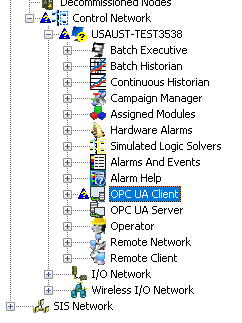
  2. Select the OPC UA Client and right-click Properties. The system displays the OPC UA Client dialog.
  3. Click Enable OPC UA Client.
  4. Click the Certificate tab.
  5. Click OK.
  6. Select the OPC UA Client and right-click, New OPC UA Physical Device. The system displays the physical device (PDT) properties dialog.
  7. On the General tab, enter a description for the physical device. Physical devices correspond to OPC UA servers. You may want to include information in the description that identifies the server.
  8. On the Primary tab, enter the opc.tpc protocol URL for the server in the Endpoint Url field.
    Note

    If the URL contains a hostname and not an IP address, you must have a DNS server configured that will resolve that hostname to a static IP address with a lease time set to infinite (so that the IP address will remain in the DNS table). If a dynamic IP address is used for your endpoint (such as one assigned by DHCP), you will have to update the DNS table with the new IP address every time it is reassigned.

  9. For redundant servers, enter the secondary opc.tcp protocol URL on the Secondary tab. This step is not required for simplex servers.
  10. Click OK.
  11. Select the physical device in the DeltaV Explorer hierarchy and right-click, New OPC UA Logical Device. The system names physical devices PDT1, PDT2, and so on.
  12. Select the logical device and right-click Properties. The software displays the OPC UA Logical Device dialog. The system names logical devices LDT1, LDT2, and so on.
  13. On the General tab, enter a description to differentiate this from other logical devices.
  14. On the Subscription Settings tab, enter the Publishing Interval. The publishing interval is the interval at which the client pulls data from the server.
  15. Click OK.
  16. Click the OPC UA Client, then right-click Download.
    The system displays the Confirm Partial Download dialog.
  17. Click Yes.
  18. If you receive any warnings (for example, the primary connection for PDT1 does not have a server application certificate configured), click Download Anyway.
  19. Before creating signals in the client to read server data, test to make sure that the client can communication with the server.