OPC Unified Architecture (OPC UA) and the DeltaV system

Create an OPC UA server

Note

This task describes how to create a DeltaV OPC UA server without security features. Refer to the related information for information on OPC UA security.

  1. Navigate to the OPC UA Server subsystem in the DeltaV Explorer hierarchy. The OPC UA server subsystem is underProfessionalPlus workstations, Application workstations, and DeltaV PK controllers. This procedure is for an OPC UA server on a ProfessionalPlus workstation. Creating a server on a DeltaV PK controller is similar.
    Note

    Make sure the node name does not contain a $ character. This is not a legal character in OPC UA applications with digital certificates.
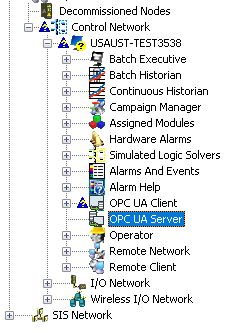
  2. Select the OPC UA Server subsystem, right-click and select Properties. The system displays the OPC UA Server dialog.
  3. Click Enable OPC UA Server.
    Important

    Enabling the OPC UA server can consume large amounts of memory (viewable in the FreMem parameter). This happens because OPC UA creates an address space for every parameter of every function block in each module in the controller.

  4. On the General tab, select an option under User Authentication.
    Refer to Related information for topics on security and user authentication.
  5. Use the Certificate tab to generate or import your certificate.
  6. The PK controller's OPC UA server has an Advanced tab. Use this to specify the primary and secondary port addresses.

    The endpoint URL is shown on the Advanced tab.

  7. Click OK.
  8. Right-click the OPC UA Server and select Download.