The DeltaV SIS software components are integrated with the DeltaV software. Enabling DeltaV SIS software from System Preferences adds SIS objects to the DeltaV Explorer and Control Studio so you can configure DeltaV logic solvers and SIS modules. For example, the following figure shows DeltaV Explorer after the SLS 1508 logic solvers preference has been enabled and some configuration has been completed.
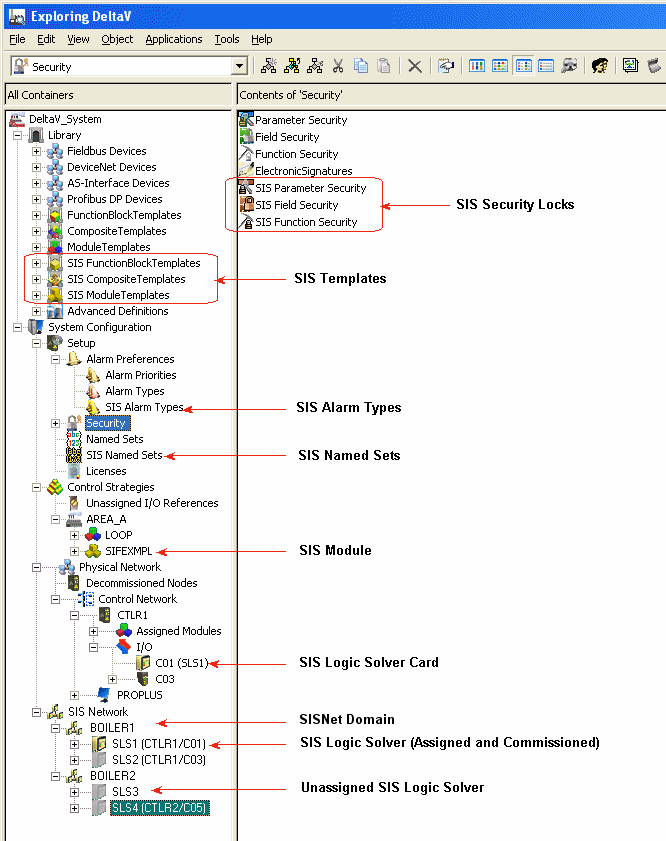
The most obvious difference when SLS 1508 logic solvers are enabled is the appearance of the SIS Network. The SIS Network contains the SLS 1508 logic solvers (SLS1, SLS2, SLS3, and SLS4 in the figure). Each Logic Solver contains the configuration information (assigned SIS modules, I/O configuration, alarms, and secure parameters) that will ultimately be downloaded to a physical Logic Solver card. The other noticeable differences (in this figure) are the icons for Logic Solver cards (C01) and SIS module (SIFEXMPL). Enabling DeltaV SIS software also adds SIS items to Library and Setup.