The example physical SIS Network layout consisting of three fiber optic rings and three SIS Network domains is shown in the following figure.
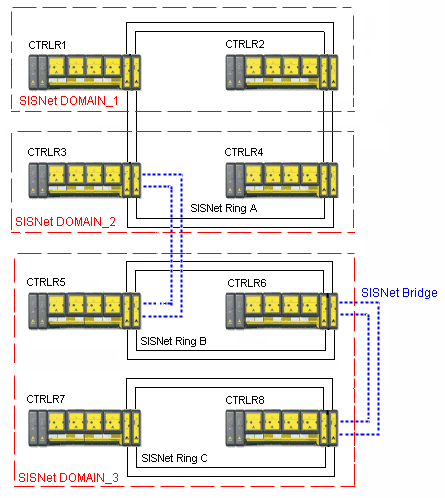
The example consists of three physical rings, three SIS Network domains, and two SIS Network bridge connections. This layout is used in most of this section to show how different physical ring and domain definitions appear in DeltaV Explorer and in DeltaV Diagnostics.
References to secure parameters requires that the parameters be defined correctly (local, domain, or system) and a physical connection between the publisher of the secure parameter and the logic solver referencing the secure parameter. Therefore the following is a partial list of the communication abilities of the example layout:
-
CTRLR1 and CTRLR2 are in the same domain and on the same physical ring so they can communicate with Domain Global parameters.
-
Even though CTRLR1 and CTRLR4 are on the same physical ring, they are in different domains so they can communicate only with System Global parameters.
-
CTRLR4 and CTRLR6, even though they are in different domains and different physical rings, can communicate with System Global parameters over the SIS Network bridge between CTRLR3 and CTRLR5.
-
CTRLR5 and CTRLR8 are in the same domain but different physical rings. They can communicate only with System Global parameters over the SIS Network bridge between CTRLR6 and CTRLR8.
-
CTRLR7 and CTRLR8 cannot communicate with any controller in DOMAIN_1 or DOMAIN_2 as this would require communication through two bridge connections.