The Repeater Connection List (RCL) is primarily useful in diagnosing problems with physical connections, the fiber optic rings and the SIS Network bridge connections. The RCL is a two pane window. The left pane contains a view of the physical rings and SIS Network bridges in the SIS Network. The right pane contains diagnostic parameters and values for items selected in the left pane. The following figure shows how the example layout appears in the left pane of the Repeater Connection List.
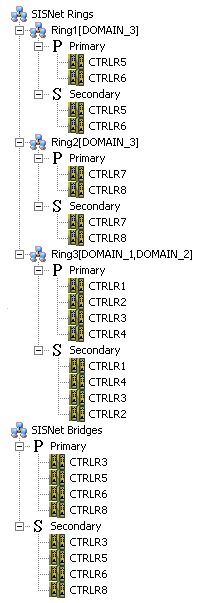
The left pane of the RCL presents both physical ring and SIS Network bridge view of the SIS Network. The first time you open the RCL DeltaV Diagnostics queries the SIS Network and saves the topology. If you close and reopen RCL, it uses this saved topology. If your network topology changes you can rediscover the topology from the Diagnostics main window.
RCL finds physical rings and names them Ring1, Ring2, and so on. You cannot change these names. The rings detected are shown under the SIS Network rings portion of the view. In this view, repeaters are represented by their host controllers. All repeaters in a ring are represented by the controllers under a Primary or Secondary branch. For example, CTRLR5 in the Primary branch under Ring1 represents REPEATER01 on CTRLR5. Similarly, CTRLR5 in the Secondary branch under Ring1 represents REPEATER02 on CTRLR5. This view of the SIS Network also indicates the domains (or parts of domains) contained in each ring (in brackets after each ring name). For example, Rings 1 and 2 both contain a portion of DOMAIN_3.
You may want to maintain a list that maps the ring names in the RCL to your physical rings. For example, the following table shows the mapping between the ring names in the example layout with the rings discovered by the Diagnostics software.
The software also determines which controllers in the network are connected by repeater connections and shows them in the SIS Network bridges portion of the view. Each repeater end of a bridge connection is represented by the controller hosting the repeater.
DeltaV Diagnostics saves the SIS Network information (the topology) so it does not have to be rediscovered on subsequent uses of the RCL. However, if you know the topology has changed (you have reconfigured the rings or domains, renamed or replaced controllers, or replaced repeaters), use the Discover Network Topology command to refresh the network information. Depending on the changes made to the network, the relationship between the physical rings and domains may change, as well as the mapping to your names for the rings.