The LSAI function block accesses a single analog measurement value and status from an input.
The LSAI function block supports signal scaling, signal filtering, signal status calculation, and simulation.
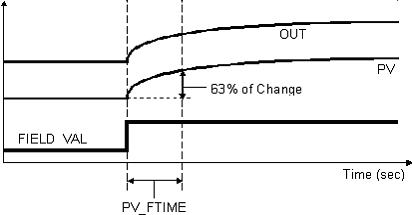
The block's output parameter (OUT) reflects the process variable (PV) value and status.
When you configure the LSAI function block, you select the input associated with an analog measurement by configuring the Device Signal Tag (DST) of the IO_IN parameter. You select the DST and the parameter the LSAI block accesses on that input. In SLS 1508 systems the input specified can be one of the 16 channels on this logic solver or an input channel on a logic solver on the same controller. In CHARMs Smart Logic Solver systems the input specified can be any of the CHARMs of any CSLS in the Local Safety Network.
Signal Conversion
Choose direct, indirect, or indirect square root signal conversion with the linearization type parameter (L_TYPE).
Select one of the following signal conditioning options:
-
Direct — PV becomes the input value. OUT becomes the PV value.
-
Indirect signal conditioning — linearly converts the accessed input value (or the simulated value when simulation is enabled) from percent to the range and units of the PV and OUT parameters (OUT_SCALE).
-
Indirect square root signal conditioning — converts the accessed input value (or the simulated value when simulation is enabled) from percent by taking the square root of the value and scaling it to the range and units of the PV and OUT parameters (OUT_SCALE).
You view the accessed value in percent through the FIELD_VAL parameter.
The DeltaV system cannot change the scaling in a HART device connected to a logic solver channel or CHARM. Such changes must be done using AMS Device Manager or a handheld configurator. These changes do not propagate into the DeltaV database.
Simulation
To test a module's logic, download to a simulated logic solver (a logic solver assigned to the ProfessionalPLUS workstation), enable the SIMULATE parameter, and supply an input value. Note that you cannot enable the SIMULATE parameter when the LSAI block is running in a physical Logic Solver card.
You must configure the LSAI block completely to successfully download and use for simulation. This includes:
-
Enable a channel in the simulated Logic Solver card.
-
Define the channel type as Analog Input.
-
Assign the DST to the LSAI block's IO_IN parameter.
-
Save and download the module.
You cannot download a simulated Logic Solver card with SIS modules containing incompletely configured LSAI and LSDI blocks.
To change a value from Control Studio Online, open the SIMULATE properties dialog and set a simulate value and status.
When SIMULATE is enabled, the value and status of the SIMULATE parameter become the value and status of FIELD_VAL.