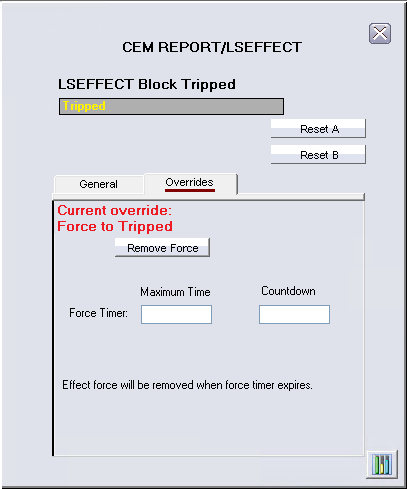
This tab can include the following buttons, depending on status of various block parameters. The table describes the parameter values that cause the buttons to be displayed and the results of clicking the buttons.
- Remove Force (including force timer maximum time and remaining time).
- Force Trip and Force Normal.
- Allow Forces
- Disallow Forces (can also include a red stop sign icon. This icon indicates removing the force permit will result in a trip.)
This tab can also display Forces are not permitted at this time if FORCE_PERMIT parameter is false and FORCE_OPTS parameter is not set to Force Permit Not Required To Force To Tripped.
|
Button |
Parameter Values that Cause this Button to Appear |
Action |
|---|---|---|
|
Remove Force |
OVERRIDES equals Forced to Trip or Forced to Normal. |
Opens a secure write dialog that enables you to change the value of FORCE_EFFECT to Do not Force. |
|
Force Trip |
OVERRIDES is not equal to Forced To Trip and FORCE_PERMIT is True, or the Force Permit Not Required To Force to Tripped bit in FORCE_OPTS is True. |
Opens a secure write dialog that enables you to change the value of FORCE_EFFECT to Force Trip. |
|
Force Normal |
OVERRIDES is not Forced to Normal and FORCE_PERMIT is True. |
Opens a secure write dialog that enables you to change the value of FORCE_EFFECT to Force Normal. |
|
Allow Forces |
FORCE_PERMIT is False and FORCE_OPTS is Force permit control should be visible in operator interface. |
Opens a secure write dialog that enables you to change the value of FORCE_PERMIT to True. |
|
Disallow Forces |
FORCE_PERMIT is True and the FORCE_OPTS is Force permit control should be visible in operator interface. |
Opens a secure write dialog that enables you to change the value of FORCE_PERMIT to False. If there is a stop sign icon next to the button, LATENT_TRIP is True. Clicking Disallow Forces results in a trip because there is n effect being forced to Normal that has one or more active causes. |