 Use the Build Dynamo expert to build a dynamo from the selected
objects. You must open the Dynamo Set that will include this dynamo before
using this expert and you must delete the working copy of the dynamo from the
picture before using the new dynamo. A dynamo can support multiple parameters
but only from a single module. You cannot create a dynamo that references
multiple modules, for example, LOOP_1 and LOOP_2.
Use the Build Dynamo expert to build a dynamo from the selected
objects. You must open the Dynamo Set that will include this dynamo before
using this expert and you must delete the working copy of the dynamo from the
picture before using the new dynamo. A dynamo can support multiple parameters
but only from a single module. You cannot create a dynamo that references
multiple modules, for example, LOOP_1 and LOOP_2.
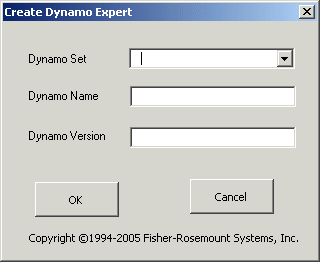
Dynamo Set - Enter the name of the Dynamo Set where this dynamo will be saved or click the down arrow and select a dynamo set.
If you have a newly created dynamo set, be sure to use the command to save and name the new dynamo set. Do not use the Save toolbar button because it fails to save the new dynamo set with the default name.
Dynamo Name - Enter a name for the new dynamo.
Dynamo Version - Enter a version number for the new dynamo. The version number must be in the form X.Y where X and Y are both integers. For example, 1.2 is a valid version number.
Remember to delete the working copy of the dynamo from the picture.