The following figure shows how an SIS simulation configuration appears in DeltaV Explorer.
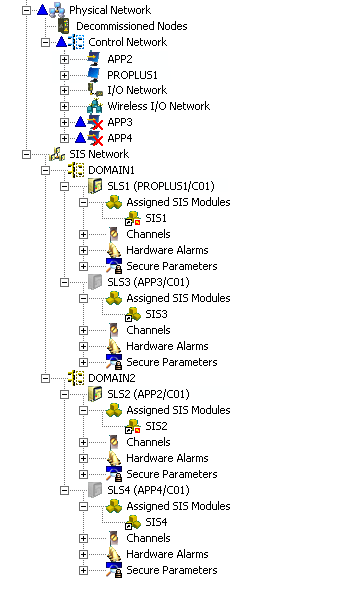
Each assigned module in the example configuration contains one secure parameter, SECPARAM1. All of the modules are in AREA_A. The following table summarizes configuration information for the example.
|
Domain |
Logic Solver |
Publish Scope |
Assigned Module |
Assigned Module's Secure Parameter References |
Workstation |
Aliased Controller |
|---|---|---|---|---|---|---|
|
DOMAIN1 |
SLS1 |
System |
SIS1 |
SIS1/SECPARAM1 SIS2/SECPARAM1 SIS3/SECPARAM1 SIS4/SECPARAM1 |
PROPLUS1 |
CTRLR1 |
|
SLS3 |
Domain |
SIS3 |
SIS1/SECPARAM1 SIS2/SECPARAM1 SIS4/SECPARAM1 |
APP3 |
CTRLR3 |
|
|
DOMAIN2 |
SLS2 |
System |
SIS2 |
SIS1/SECPARAM1 SIS4/SECPARAM1 |
APP2 |
CTRLR2 |
|
SLS4 |
System |
SIS4 |
SIS1/SECPARAM1 SIS2/SECPARAM1 |
APP4 |
CTRLR4 |
At some point during configuration you may need to test a module that references a global secure parameter in a logic solver assigned to a workstation that does not physically exist. In the example module SIS1contains references to secure parameters SIS3/SECPARAM1 and SIS4/SECPARAM1 (shown in bold in the table). The workstations simulating the controllers and logic solvers that contain these parameters do not exist. To test the logic of module SIS1 these parameters must be simulated.
The workstation holding the secure parameter does not have to physically exist. Only the placeholder in DeltaV Explorer must exist. To simulate a global secure parameter requires the following:
-
The secure parameter must be configured in a module.
-
The module it is in must be assigned to an SLS under the SIS Network.
-
The logic solver publishing the secure parameter must be publishing in the appropriate scope (Domain or System) for the reference.
-
The SLS must be assigned to an SIS card on a workstation other than the one holding the reference.
To simulate global secure parameters you must first determine the global slot, logic solver slot, and revision of the secure parameters being referenced. The following sections show how to do this for both Domain and System Global Secure Parameters.