In DeltaV SIS Simulate, workstations simulate controllers. If you need to simulate only one controller, you can use the ProfessionalPLUS workstation. To simulate additional controllers, use appropriately licensed Application Stations. The Simulated Logic Solvers subsystem is where you add simulated SLS 1508 logic solver cards. The subsystem can hold a controller's complement of logic solver cards--as many as 32 simplex or 16 redundant. You can mix simplex and redundant logic solver cards in a simulated controller.
From the properties dialog of the Simulated Logic Solvers subsystem in each workstation create an alias that corresponds to an actual controller in the physical system. The alias appears in parentheses next to the subsystem in DeltaV Explorer.
Create simulated Logic Solver Cards by selecting a Simulated Logic Solvers subsystem, then select New Card from the context menu.
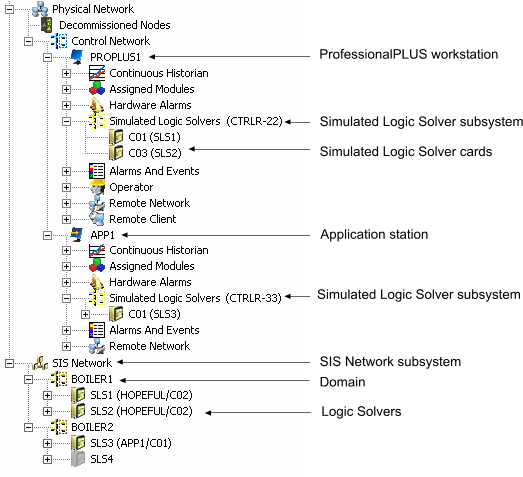
The following figure shows a portion of the DeltaV Explorer hierarchy that includes the ProfessionalPLUS workstation and an Application Station (with aliased Simulated Logic Solver subsystems) and simulated logic solver cards. The logic solvers have been assigned to simulated logic solver cards. Most of the logic solvers have been commissioned and downloaded.
You cannot create any other type of card in the Simulated Logic Solvers subsystems. If the DeltaV system you are simulating has other types of cards, add the simulated Logic Solver cards in the slots that correspond to the actual slots in the physical installation. If you do not, the logic solver CRCs change because the slot number changes.
The only effects of specifying that a simulated Logic Solver card is redundant are:
-
Four card slots are allotted for redundant cards, the same as redundant cards in the physical system.
-
CRCs for redundant cards are different than for simplex cards.
Simulated redundant Logic Solver Cards act in a manner similar to physical redundant Logic Solver Cards.