Control Studio uses the Secure Write Mechanism to write parameters in SIS modules as well as perform debug operations on SIS modules.
Parameter writes from Control Studio are performed using the Set Value command (or Force Input/Remove Force Input command, available in Debug mode only) or through the Parameter Properties dialog. If Electronic Signature is enabled for a parameter, then the Electronic Signature dialog appears ahead of the secure write confirmation dialog. After the Electronic Signature is completed, the secure write confirmation dialog is displayed. If the Electronic Signature is not completed, the secure write will not be attempted and the secure write confirmation dialog will not appear.
The following debug activities on an SIS module are subject to the Secure Write Mechanism:
-
Enter Debug View
-
Leave Debug View (see note below)
-
Start (only implemented on a simulated Logic Solver)
-
Stop (only implemented on a simulated Logic Solver)
-
Run Once (only implemented on a simulated Logic Solver)
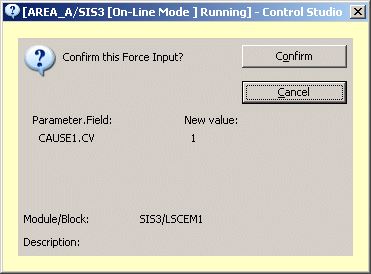
The following is an example of a secure write confirm dialog of a Force Input request in Control Studio in online mode.
Forced inputs are always removed when an SIS module leaves Debug mode. All SIS modules on a Logic Solver are always forced out of Debug mode when the Logic Solver is locked.