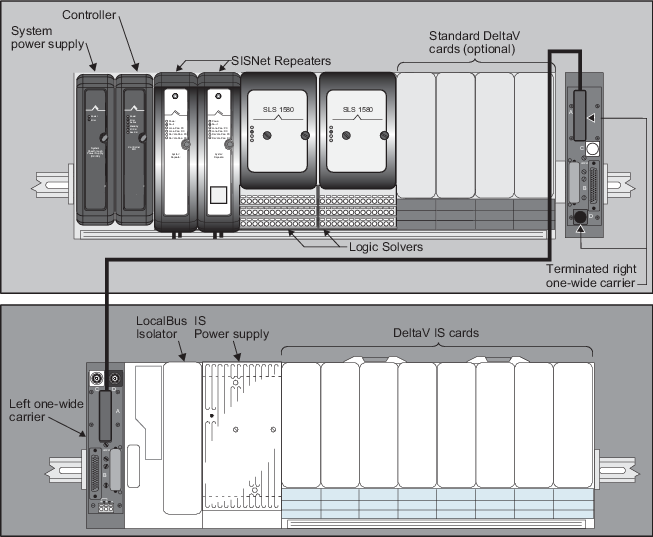
- Install a right one-wide carrier onto the 8-wide carrier installed with DeltaV SIS components by sliding together the 48 pin connectors on the carriers.
- Install a left one-wide carrier onto the 8-wide carrier to be installed with DeltaV I.S. cards by sliding together the 48 pin connectors on the carriers.
- Terminate the right one-wide carrier.
- Connect the 44 pin D-shell (male) connector on the one-wide carrier extender cable to the top D-shell (female) connector on the terminated, right one-wide carrier and fasten the retainer screws.
- Connect the 44 pin D-shell connector on the other end of the cable to the top D-shell connector on the left one-wide carrier and fasten the retainer screws.
- Install a LocalBus Isolator and I.S. Power Supply on the 8-wide carrier holding the DeltaV I.S. cards to separate standard DeltaV cards from DeltaV I.S. cards. Refer to the DeltaV TM M-series Hardware Installation and Reference manual for information on installing DeltaV I.S. components.