To install OPC Mirror as a redundant subsystem, you must first set up a pair of Application Stations by creating an Application Station in DeltaV Explorer, and then enable the Enable Redundancy for Assigned Modules option on the Redundancy tab of its Properties dialog. Also, you must select OPC DA Server and OPC Mirror from the pull-down list for the Redundant OPC option.
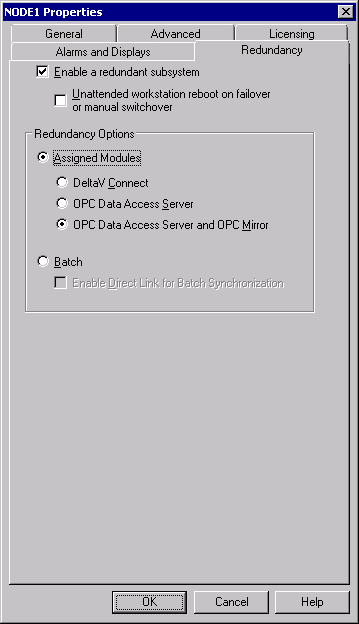
After setting up the Application Station pair, install OPC Mirror on each Application Station, run the Setup.exe file located in the DV_Extras\OPCMirror folder on the DeltaV installation disk #4.
To be used redundantly on a pair of Application Stations, OPC Mirror must be installed in the same directory path on each workstation in the pair. By default, OPC Mirror is installed in C:\Program Files (x86)\FRS\OPC Mirror. If you specify a different location when installing OPC Mirror on one of the Application Stations, you must also specify the same installation directory path on the other Application Station. Because OPC Mirror runs as a service in Windows, it must be started by a user whose security permissions are set to Full Control for this directory.
After installing OPC Mirror, complete the following steps:
-
Start the OPC Mirror service by right-clicking the
OPC Mirror icon
 in the System Tray , and then
selecting
Start OPC Mirror Service from the shortcut
menu. (You can also start the OPC Mirror service by using the Computer
Management program in Windows.)
Note
in the System Tray , and then
selecting
Start OPC Mirror Service from the shortcut
menu. (You can also start the OPC Mirror service by using the Computer
Management program in Windows.)
NoteIf the OPC Mirror setup program initiates a system restart during installation, you do not need to manually start the OPC Mirror service, because it starts automatically on system startup, by default.
ImportantAfter setting up OPC Mirror for redundancy and downloading the Application stations, if the value of the MirLic (OPC Mirror Redundancy Enabled) or MirPAvail (OPC Mirror Partner Application Available) parameters in DeltaV Diagnostics is NO, stop the OPC Mirror service (if necessary), and then restart it on both Application Stations.
-
Start the OPC Mirror Configuration program to add OPC servers and
items and to define server monitoring specifications. To start the OPC Mirror
Configuration program, right-click the
OPC Mirror icon
in the System Tray, and then
select
Configure from the shortcut menu, or select
on the
Start menu.