The Device Commissioning view is the default view in DeltaV Device Commissioner, where you can keep track of I/O nodes you are performing commissioning on, and see and select from all the I/O nodes where devices can be commissioned. The following figure shows the Device Commissioning view:
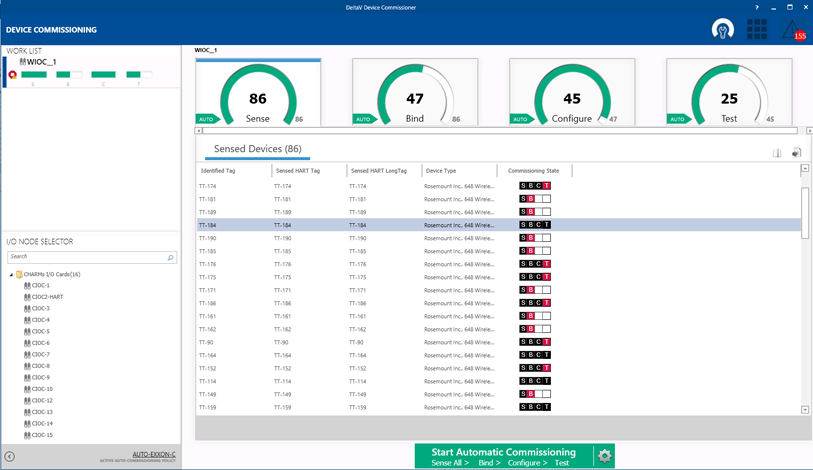
The Device Commissioning view consists of the following panes:
- Work List--Acquired I/O nodes appear in the Work List. For each acquired I/O node, the Work List displays one colored bar icon for each commissioning phase. To release an acquired node, right-click it in the Work List pane and select Release.
- I/O Node
Selector--The I/O Node Selector shows all I/O nodes that have been
commissioned in DeltaV Explorer. DeltaV Device Commissioner can commission
devices only on those I/O nodes. In order to commission devices on an I/O node
in DeltaV Device Commissioner, you must first acquire the node. Each node can
be acquired by only one user at a time. If another user has acquired a node,
the node displays the locked icon
 . To acquire a node,
right-click it in the I/O Node Selector pane and select
Acquire.
. To acquire a node,
right-click it in the I/O Node Selector pane and select
Acquire.
- Commissioning
Phases--In this pane you can select any commissioning phase and see all
devices in that phase of commissioning for the selected I/O node.
At the bottom of each commissioning phase tab, a message in red text appears displaying the number of devices, if any, that failed to pass the selected phase.
The phase progress indicators shown in the following figure display the progress made in each phase of commissioning.
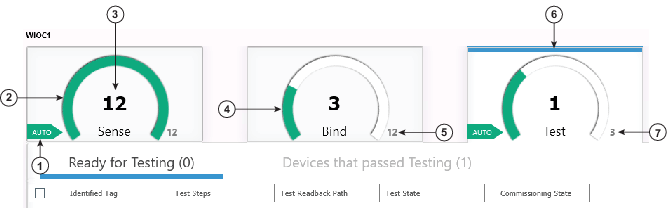


Note that in the commissioning project example shown above, the active auto-commissioning policy specifies that DeltaV Device Commissioner does not apply AMS configuration data. Therefore, the Configure phase does not appear in the Device Commissioning view.