DeltaV Device Commissioner offers three views of the device commissioning process. Select a view by clicking one of the icons at the top right of the DeltaV Device Commissioner window, shown in the following figure:
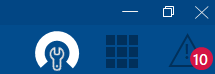
From left to right, the icons represent the following three views:
- Device Commissioning view--The default view in DeltaV Device Commissioner, where you can keep track of I/O nodes you are performing commissioning on, and see and select from all the I/O nodes where devices can be commissioned.
- Commissioning Dashboard view--The view that enables you to monitor commissioning progress across the DeltaV system.
- Punch List view--The view where you manually resolve issues that DeltaV Device Commissioner encounters during the commissioning process. Note that the icon for the Punch List view includes a red badge. This badge displays the total number of devices in the Punch List for all I/O nodes currently in the Work List of the Device Commissioning view.