Basic steps for installing a fieldbus segment

  1. Route the fieldbus cable and ensure that each segment is properly terminated.
    Once the segment layout is determined, a terminator must be used at both the power supply side and the field side of the main trunk cable. The segment layout will determine the location of the terminators and whether or not an integrated terminator on the power supply or device connection block is used. Remember that spur cables are not part of the main trunk and are normally not considered in the placement of the terminators.
    Important

    If using ferrules on the wires, use ferrules with an uninsulated shaft of adequate length to prevent the ferrule insulator from interfering with the connectors.
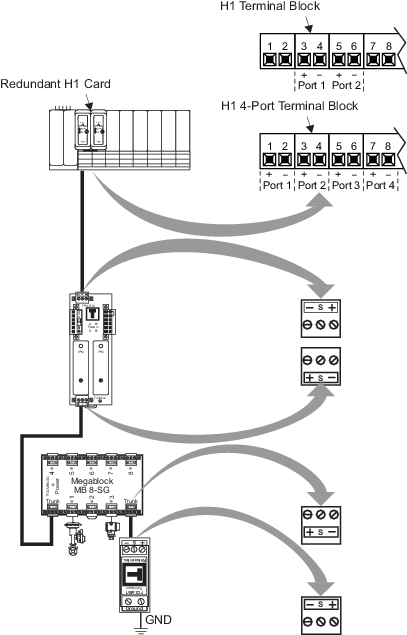
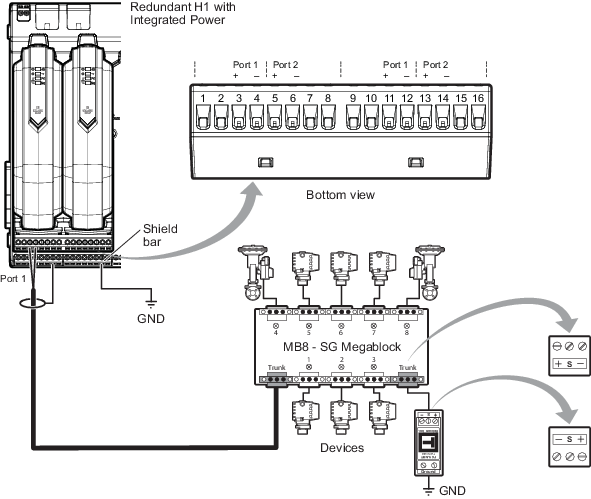
    Example:
    Figure: Redundant H1 card installation


    Figure: Redundant H1 with Integrated Power card installation


  2. Install the redundant H1 cards or redundant H1 with Integrated Power cards, connect to the segment, and enable the appropriate ports.
  3. Install the devices using the following information:
    If the devices then
    have their device tags assigned connect all the devices to the segment and commission the devices following the instructions in the DeltaV Explorer online help.
    do not have their device tags assigned most devices ship with a label on which is printed the device’s serial number and device ID. The label is used to identify the device in the field. Assign the device tags based on the labels, and then connect all the devices to the segment and commission the devices following the instructions in the DeltaV Explorer online help.
    do not have their device tags assigned and there is no label with device ID and serial number
    • Connect the devices to the segment one at a time
      Note

      Connect one at a time because without knowing the device ID, it is difficult to determine which device you are attempting to commission if you connect several devices of the same type to the segment at the same time.

    • Verify that each device appears in the de-commissioned devices list for the port
    • Commission the devices, following the instructions in the DeltaV Explorer online help
  4. Perform the installation checkout.