As you develop a system of operator pictures, you may need to use an object (such as a pipe, pump, or valve) in more than one picture. You can save such custom-built objects as reusable graphics called dynamos. If you assign dynamic properties to an object, those properties are retained when you save it as a dynamo.
In configure mode, DeltaV Operate provides prebuilt dynamo sets containing common process control objects, such as pumps, that you can paste into your pictures rather than drawing them yourself. You can modify an existing dynamo and save it in the original set or in a new set. You will likely want to save your most used dynamos in your own dynamo sets.
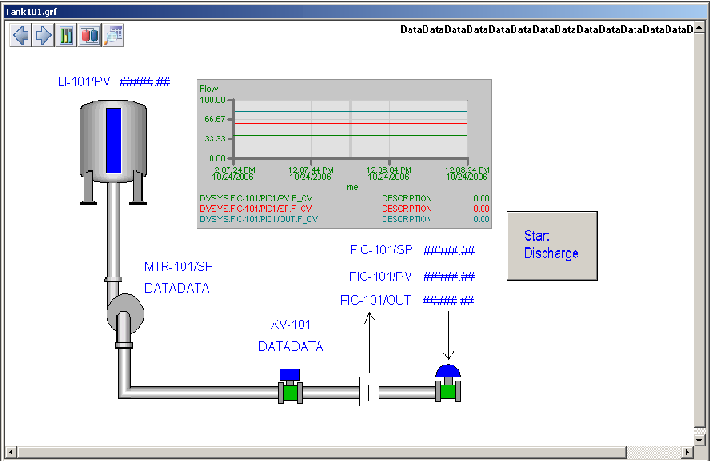
To complete the TANK101 process picture, you will use several different dynamos and modify their dynamic properties. Following is a brief summary of what you will do in the next few procedures.
-
Add a pump dynamo and animate the color. It will change from red to green to signal the pump going from off to on.
-
Add a tank dynamo with dynamic properties. The tank level will change to show the gradual discharge of its contents.
-
Add a block valve and regulatory valve. The valves will change color to show their state (closed or open).
-
Add pipes to connect the other objects. These could also be made to change color, but you will not assign dynamic properties in the example.
The picture will look something like the following figure. Use this as a guideline for placing objects on your picture.
If DeltaV Operate is not open, open it in configure mode, expand the Pictures folder in the system tree, and then double-click the tank picture file, TANK101.