At the beginning of this chapter, we talked about picture hierarchies and linking pictures to make it easy for the operator to go through a series of related pictures in a defined order. You set the order by setting the Next and Previous Pictures in the Picture dialog. The operator can go forward and back through the defined sequence by clicking the arrow buttons that are standard in the main template.
By default, the Overview button on the DeltaV opening picture is connected to a standard Overview picture. In our example, the hierarchy for the tank process will consist of a simple loop connecting the TANK101 picture to a copy of the standard Overview picture. If we also connected the main DeltaV opening picture to our copy of the standard Overview picture, the organization of pictures would look as follows:
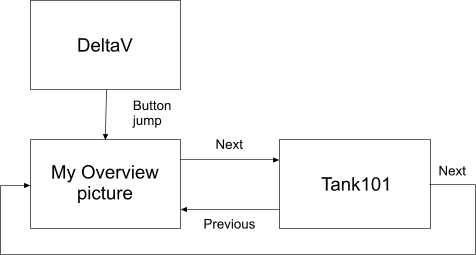
In a more complex system, this horizontal loop might contain a series of tank pictures or perhaps a progression from a tank picture to a boiler picture to a reactor picture. You can have a number of these horizontal loops to define sequences of related pictures. It is just a matter of determining the sequence you want and then setting the Next and Previous pictures.
In addition, you can have jump-style links, such as pushbuttons, to replace the current picture with one that is not in the defined sequence. Such links can be placed on your Overview picture or any other picture.