Perform the following steps to apply a device master to a device placeholder:
- Double-click the device placeholder on the I/O Explorer pane.
- From the Templates tab, select Apply Master and follow the prompts. I/O Studio opens the Device Masters folder.
- Browse to the appropriate device master, select it, and click Select.
When a master has been applied to a device placeholder, the link icon
 appears on the right side
of each configuration card for which the device master provided configuration
values. The link indicates that the properties on the card come from a master.
If you change the value of any property on the card, the icon changes to a
broken link
appears on the right side
of each configuration card for which the device master provided configuration
values. The link indicates that the properties on the card come from a master.
If you change the value of any property on the card, the icon changes to a
broken link
 , and that broken link
appears immediately to the right of each changed property.
, and that broken link
appears immediately to the right of each changed property.
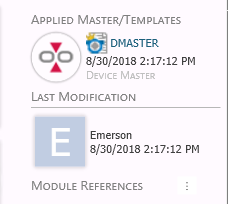
When a master has been applied to a device placeholder or master, the badge at the top right of the placeholder card is updated with the name of the master and the date on which it was applied. The following figure shows the Applied Master/Templates badge. Note that one or more configuration properties have been changed since the device master DMASTER was applied.
You can have only one device master applied to a device placeholder at a time. If you try to apply a master to a device placeholder that is already a consumer of a master, I/O Studio prompts you to remove the association with that master before applying the new master.