To create a new device master, perform the following steps:
- From the I/O Tools menu on the Home tab, select New>>Device Masters>>Device Master or New>>Device Masters>>SIS Device Master.
- Configure the values on each configuration card for the new device master.
To create a new device configuration template, perform the following steps:
- From the I/O Tools menu on the Home tab, select New>>Device Configuration Templates, then select one of the following options:
- Configure the values on each configuration card for the new template.
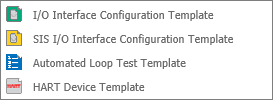
Alternatively, if you navigate down the folder structure in the I/O Library pane, you can create new categories of masters and templates. Right-click a subfolder of the Masters or Device Configuration Templates folder, select New>>Category, and name the new category folder. Then right-click the new folder, select New, and follow the prompts to create a new master or template.
The Device Definition card is often a good place to start configuring a master or template. Selecting property values limits the compatibility of the master or template to device placeholders that share the same device definition.
For certain properties, you can select the value Any. For example, you may want to select Thermocouple Input for the Device Type and Any for the Sensor Type so that a master or template is compatible with multiple types of thermocouple input devices.