An allocated device is a device placeholder that has been defined and associated with an I/O connection path (card or CHARM) or with a WIOC.
You can see all unallocated device placeholders in the DeltaV system under Unallocated Devices in DeltaV Explorer. You can also see them in I/O Studio by filtering for the Unallocated allocation state.
When you allocate an I/O device placeholder, the device is represented by a DeltaV DST under the card, CHARM, or WIOC to which it is allocated.
You can manually allocate an unallocated device placeholder in I/O Studio in any of the following ways:
- On the IO Assignment card of the unallocated device placeholder tab, click the vertical ellipsis and browse for the connection path.
- On the IO Assignment card of the unallocated device placeholder tab, type a valid connection path in the Connection Path field.
- Navigate to the node tab for the CIOC or CSLS and browse to the unallocated device placeholder.
- Navigate to the node tab for the CIOC or CSLS and type the name of the unallocated device placeholder in the Device Name field.
- Navigate to the node tab for the WIOC and add a wireless device placeholder.
You can manually allocate an unallocated device placeholder in DeltaV Explorer by doing either of the following:
- Right-click a CHARM, select Properties, and either type or browse to the name of the device placeholder in the Device Tag field of the CHARM Property Dialog.
- Drag and drop an unallocated device placeholder from the Unallocated Devices container to an I/O node or I/O channel.
Alternatively, you can use the DeltaV Device Commissioner application to automatically allocate an unallocated device placeholder.
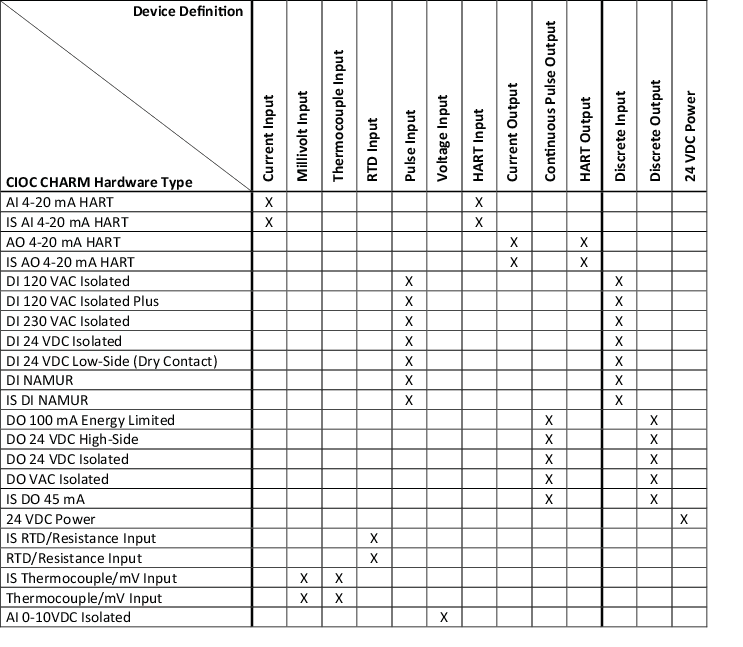
When a device placeholder is unallocated, its Device Type is Unallocated Device. When a device placeholder is allocated to an I/O node or I/O channel, the Device Type changes to the appropriate DST type for the node or channel, as shown in the following table.
| I/O Studio device definition | DeltaV Explorer DST type |
|---|---|
| Conventional Device | Device Tag |
| HART Analog Input and HART Analog Output Devices | HART Device |
| Wireless HART Devices | HART Device |
You can change the I/O interface to a different type, but if you choose a type that is incompatible with the device definition, you will be unable to save the configuration.