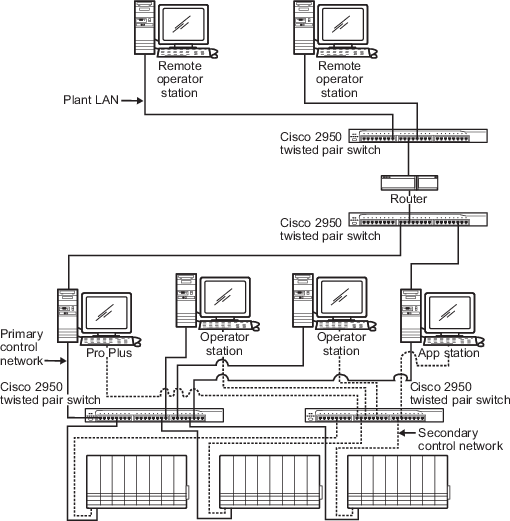
The DeltaV Remote Network is an Ethernet 10/100BaseT local area network (LAN) that provides communications between remote workstations and the DeltaV system. The DeltaV Remote Network can be a dedicated LAN that contains only DeltaV remote workstations, or it can be the plant-wide LAN that contains other personal computers or ethernet devices such as printers. A DeltaV Remote Network uses one or more Ethernet switches for communications connections. A router must be used to minimize network traffic between the plant-wide LAN and the DeltaV system.
The DeltaV Remote Network is connected to the DeltaV system through a DeltaV Application Station or the ProfessionalPLUS workstation running DeltaV Remote Access Services (RAS) server. To support the engineering applications and the DeltaV Guardian application on remote workstations and to upload displays from any workstation, the remote network must also be connected to the ProfessionalPLUS workstation. To support accessing batch data or to control batches from any workstation, the remote network must also be connected to the Application station.
The Application Station and ProfessionalPLUS nodes are not automatically designated as remote servers during the installation process. If you enable remote network redundancy for your remote nodes when you configure the workstation in DeltaV Explorer, you must also enable remote network redundancy (in DeltaV Explorer) for the ProfessionalPLUS and any of the Application Station nodes that are connected to the remote network. If remote network redundancy is not enabled, you will be unable to view the data remotely if the Primary network connection is lost.
The DeltaV Remote Network can be simplex or redundant. Additional Ethernet interface cards, separate from the control network interfaces, can be added to the Application Station and ProfessionalPLUS workstations to support the DeltaV Remote Network.
The wiring and installation for the remote network should follow the same guidelines as the control network.
The remote network is also designed to support various network connectivity options, such as Microwave or leased line type connections as well as standard direct LAN connections. When using a slow network link option, remote workstations can be connected through a Remote Application Station. The Remote Application Station is connected through an Application Station on the DeltaV Control Network. This type of connection increases communication performance through the slow network link.
There are many possible remote network layouts for various system sizes and connection options. Figure: Dedicated Remote Network shows a remote network dedicated to the DeltaV system. Both the Application Station and the ProfessionalPLUS workstation are functioning as RAS servers.
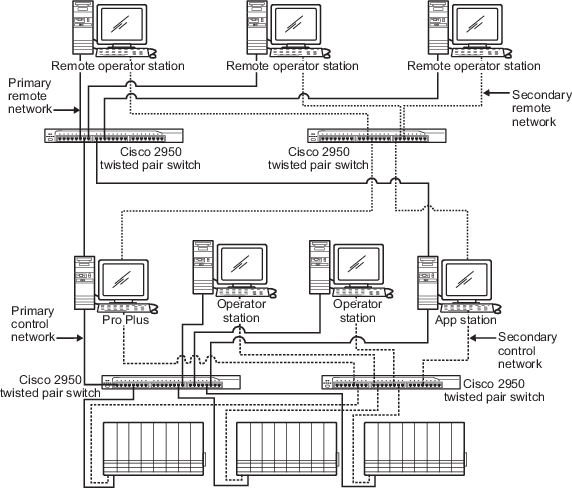
Figure: Remote Plant-Wide LAN Connected to a DeltaV System shows the use of a router to minimize network traffic between the DeltaV system and a remote plant LAN. Both the Application Station and the ProfessionalPLUS workstation are functioning as RAS servers.