The standard Control Network is an isolated Ethernet local area network (LAN) that provides communication between the controllers and workstations. It uses one or more Ethernet hubs or switches for communications connections. The Control Network is dedicated to the DeltaV system; no other devices can be attached. A separate Ethernet interface is provided through the DeltaV Application Station or ProfessionalPLUS to connect the DeltaV system to a plant-wide LAN. To minimize the traffic on the plant-wide LAN, configure a router to filter the IP addresses. Refer to the DeltaV Books Online for more information on configuring a router.
This section provides basic hub installation examples and includes cable-specific information and requirements for installing the Control Network. The "Control Network Specifications" section provides details on cable shield orientations and contains diagrams that show switches connected in cascade and star topologies, fiber-optic and twisted pair cable connections, and switch configuration.
To set up the Control Network, install the hub and connect network communication cables between nodes (controllers and workstations). The hubs can stand alone or can be linked (cascaded) to other hubs. Each hub is equivalent to a single IEEE 802.3 repeater (1 hop). The number of hops that are allowed and the maximum distance between each hop varies with the type of hub and whether the link is 10Mbit or 100Mbit. 10Mbit links allow four hops and 100Mbit links allow two hops.
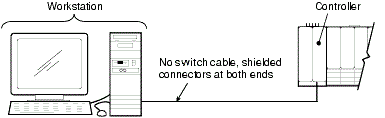
No-hub cable, also called crossover cable, is for systems with no Control Network Hub. Its wiring is different from that of the straight-through Ethernet cables used with DeltaV Control Network Hubs.