|
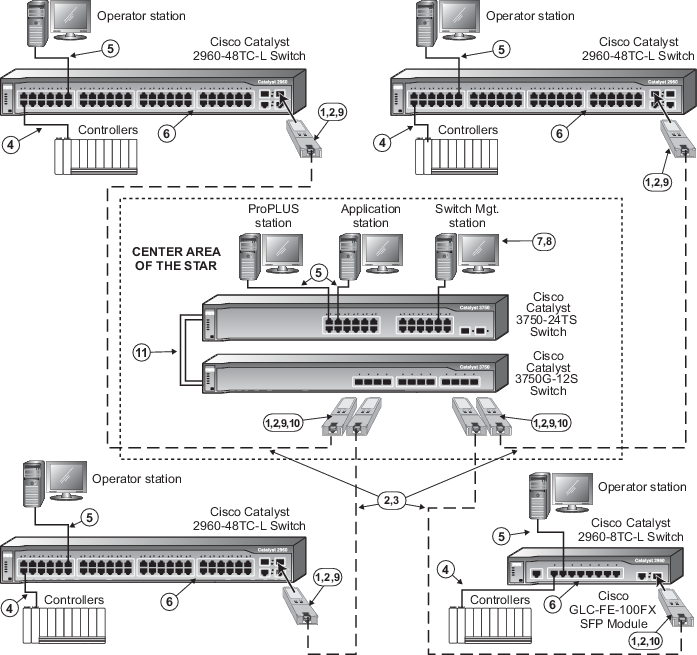
The SFP slots can be fitted with any
combination of the SX or LH fiber-optic transceiver modules. The SX module
supports up to 550 meters of Multimode Fiber and the LH module supports up to
10 kilometers of Single Mode Fiber. Fiber-optic splices, patch panels, and
connector losses reduce these overall distances. The SFP slots and transceivers
operate at 1000Mb (gigabit) full duplex only.
|

|
Each SFP transceiver has a transmit port
and a receive port. An LC type duplex fiber-optic connector is required on the
end of the fiber-optic cable pair. The fiber-optic switch-to-switch connector
is a crossover cable where the transmit on one end is connected to the receive
on the other end.
|

|
For Multimode Fiber on the SX type module,
62.5/125 micron or 50/125 micron fiber can be used. For Single Mode fiber on
the LH module, a 9/125 micron fiber can be used.
|

|
100 m (max) straight-through cable. The
shield on the controller's RJ45 connector connects only to a Faraday cage in
the controller; not to the controller's DC ground. Therefore, the RJ45
connectors are floating and the single point of ground is made at the hub or
switch to which the controller is connected. Build this cable assembly with a
shielded, metal-enclosed RJ45 connector on
both ends .
|

|
100 m (max) straight-through cable. To
prevent ground loops, build this cable assembly with a shielded, metal-enclosed
RJ45 connector on one end and an isolated, plastic-enclosed RJ45 connector on
the other end. The metal connector end of this cable assembly/link
must be placed on the switch and
not on the PC.
|

|
All twisted pair ports are configured to
auto-sense speed and auto-negotiate duplex. Do not hard-configure speed or
duplex on the twisted pair switch ports or duplex mismatches, which create
communications failures, could occur. Always allow the switch to auto-sense
speed and auto-negotiate duplex.
|

|
If switch management is to be used over
the network via telnet or a web browser, be aware that access privileges and
port configuration requirements exist for the twisted pair switch-to-switch
links. Refer to "Managing Cisco Switches" in Books Online for information.
Refer to the list of reserved IP addresses that are allowed for switches on
DeltaV systems. Refer to the Cisco documentation for web management
information. A dedicated non-DeltaV PC is required for switch management.
|

|
The Management station has special
hardware and software requirements. Refer to the related topics for information
before connecting the station to the DeltaV Control Network. Refer to the Cisco
documentation for web management information. A dedicated non-DeltaV PC is
required for switch management.
|

|
Optionally, the fiber-optic link can be
100Mbit with a GLC-GE-100FX 100BASE-FX SFP module in the Cisco 3750G-12S and
the Cisco 2960-24TC-L switches.
|

|
Optionally, the fiber-optic link can be
100Mbit with a GLC-GE-100FX 100BASE-FX SFP module in the Cisco 3750G-12S switch
and a GLC-FE-100FX SFP module in the Cisco 2960-8TC-L switch.
|

|
A Cisco stacking cable is included with
the switch and can be used to connect two 3750-series switches together to form
a single switch that can be managed with one IP address.
|