|
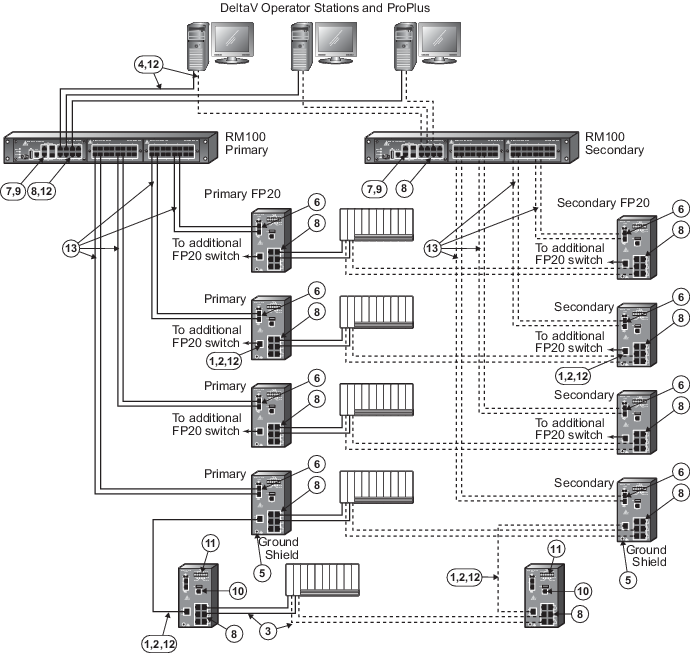
100 m (max) straight-through or crossover
cable. Cat. 5(e) Screened Twisted Pair cable is required between switches.
|

|
To prevent ground loops, build this cable
assembly with a shielded, metal-enclosed RJ45 connector on one end and an
isolated, plastic-enclosed RJ45 connector on the other end. The metal connector
end of this cable assembly/link can be placed on either switch.
|

|
100 m (max) straight-through or crossover
cable. The shield on the controller's RJ45 connector connects only to a Faraday
cage in the controller; not to the controller's DC ground. Therefore, the RJ45
connectors are floating and the single point of ground is made at the hub or
switch to which the controller is connected. Build this cable assembly with a
shielded, metal-enclosed RJ45 connector on both ends.
|

|
100 m (max) straight-through or crossover
cable. To prevent ground loops, build this cable assembly with a shielded,
metal-enclosed RJ45 connector on one end and an isolated, plastic-enclosed RJ45
connector on the other end. The metal connector end of this cable assembly/link
must be placed on the switch and not on the PC.
|

|
Use a ring tongue terminal to connect the
ground screw of the switch to a suitable shield ground. This connection
provides a ground for the twisted pair Ethernet shielded connectors.
|

|
The type of uplink ports on this switch
are determined by the switch part number. In this example, all FP20 switches
have one 100Mbit/sec full duplex single mode fiber-optic uplink ports. Other
uplink port types are available in fixed hardware configurations. SFP ports are
not available on this switch and this switch has no gigabit capable ports.
|

|
This switch has two fixed
10/100/1000Mbit/sec uplink ports and two SFP uplink ports. The SFP ports can be
fitted with optional fiber-optic SFP transceivers for long distance
communications. Only two uplinks can be active at a time in any combination of
twisted pair and SFP. Refer to the ordering information for the available SFP
transceivers.
|

|
All twisted pair ports are configured to
auto-sense speed, auto-negotiate duplex, and auto-detect polarity. Do not
hard-configure speed or duplex on the twisted pair switch ports or duplex
mismatches, which create communications failures, could occur. Always allow the
switch to auto-sense speed and auto-negotiate duplex. All unused ports of the
switch can be deactivated (locked down) by a software command from the DeltaV
station after all initial connections are made to the switch. If additional
controllers or workstations need to be connected to unused ports after the
initial lock down, an additional software command from the DeltaV station is
required to unlock the ports. After the final connections are made, the lock
down command should be reissued to the switch to lock down any remaining unused
ports. Once the ports are in a lock down state, only the original device can
communicate on its original port.
|

|
If more than one RM100 switch is required
to increase port count in an area, use any of the gigabit uplink ports for the
switch-to-switch connection to provide ample performance headroom on these
aggregating links. 100Mbit/sec links can also be used for this purpose but
normally these links are reserved for single devices on the edge of the network
such as controllers and workstations that require much less bandwidth than
switch-to-switch links.
|

|
The serial port is not required for
process communications; it is used only for occasional out-of-band switch setup
and management.
|

|
This connector is used for a +24VDC power
supply input and relay contacts.
|

|
This is a 10/100Mbit/sec twisted pair
link.
|

|
This is a 100Mbit/sec full duplex single
mode fiber-optic link. Distances up to 40 km can be achieved depending upon the
fiber-optic port option ordered and the number of intermediate splices and
patch panels used.
|